
How to turn ad clicks into sales: 8 leaks between your Meta ad and your checkout, how to spot each one, and the fix. Most stores have 2 or 3 of them. Free, no email needed.
Quick answer: if Meta sends clicks but Shopify shows few orders, the problem is usually not “bad ads”. Do two things first. Open your own ad inside the Instagram app and try to buy. Then switch off anything Meta turned on in your ads that you never chose. After that, follow the click down the funnel (clicks, page views, add to cart, checkout, purchase) and fix the step with the biggest drop.
Want to know where your sales leak, without the spreadsheet? Vibelets audits your Meta ad account and shows which ads, ad sets and placements get clicks that never turn into orders. Vibelets does the work, you make the calls.
Start your 14-day free trial · nothing charged today
Do these 2 first · Find the leak · The 8 leaks · Printable leak finder · Prompts · Two ways to fix it · FAQ
What this is
A step-by-step way to find out why your Meta ads get clicks but not sales. It is built for Shopify stores, and it works for any store that sells on its own site. You need Ads Manager, Shopify analytics and your phone. About 30 minutes.
Key takeaways
- Most lost sales happen after the click: on the page, at checkout, or inside the Instagram app’s own browser.
- Buy from your own ad on your phone, inside Instagram. It is the fastest test there is, and most store owners have never done it.
- Meta switches on ad features by default. Some change your images, text and music. Check what is on.
- Follow one click down the funnel. The step with the biggest drop is your leak. Fix that one first.
- Judge on the last 7 complete days, not today. One slow day is not a leak.
Do these 2 things first (10 minutes)
01 Try to buy from your own ad, inside Instagram
Find your top ad (Ads Manager, ad level, last 7 days, sorted by amount spent). Open it on your phone in the Instagram app, tap the button and go all the way to the payment step. Do not open the link in Safari or Chrome. Your buyers don’t.
Write down: how long the page took to load, whether a pop-up covered the product, whether the add to cart button was visible without scrolling, and which payment options showed at checkout. Shopify merchants regularly report pages and checkouts that work in Safari but break or lose payment buttons inside the Instagram and Facebook browsers. If yours did, you have found leak number one.
02 Turn off anything Meta switched on that you never chose
Open each of your top 3 ads in Ads Manager and scroll to Advantage+ creative (sometimes shown as creative enhancements). Meta can add music, change brightness, crop or expand images, add overlays and rewrite text. Some of these help. Some turn a clear product ad into something that looks like spam. Click “preview” to see what people actually see.
Do: switch off every enhancement you didn’t pick on purpose. If you want to keep one, keep it as a test and write it down with the date.
Find the leak: follow one click
In Ads Manager, go to the ad set level, last 7 days. Click Columns, then Customize columns, and add: link clicks, landing page views, adds to cart, checkouts initiated, purchases. Compare each step with the one before. The biggest drop tells you where to look.
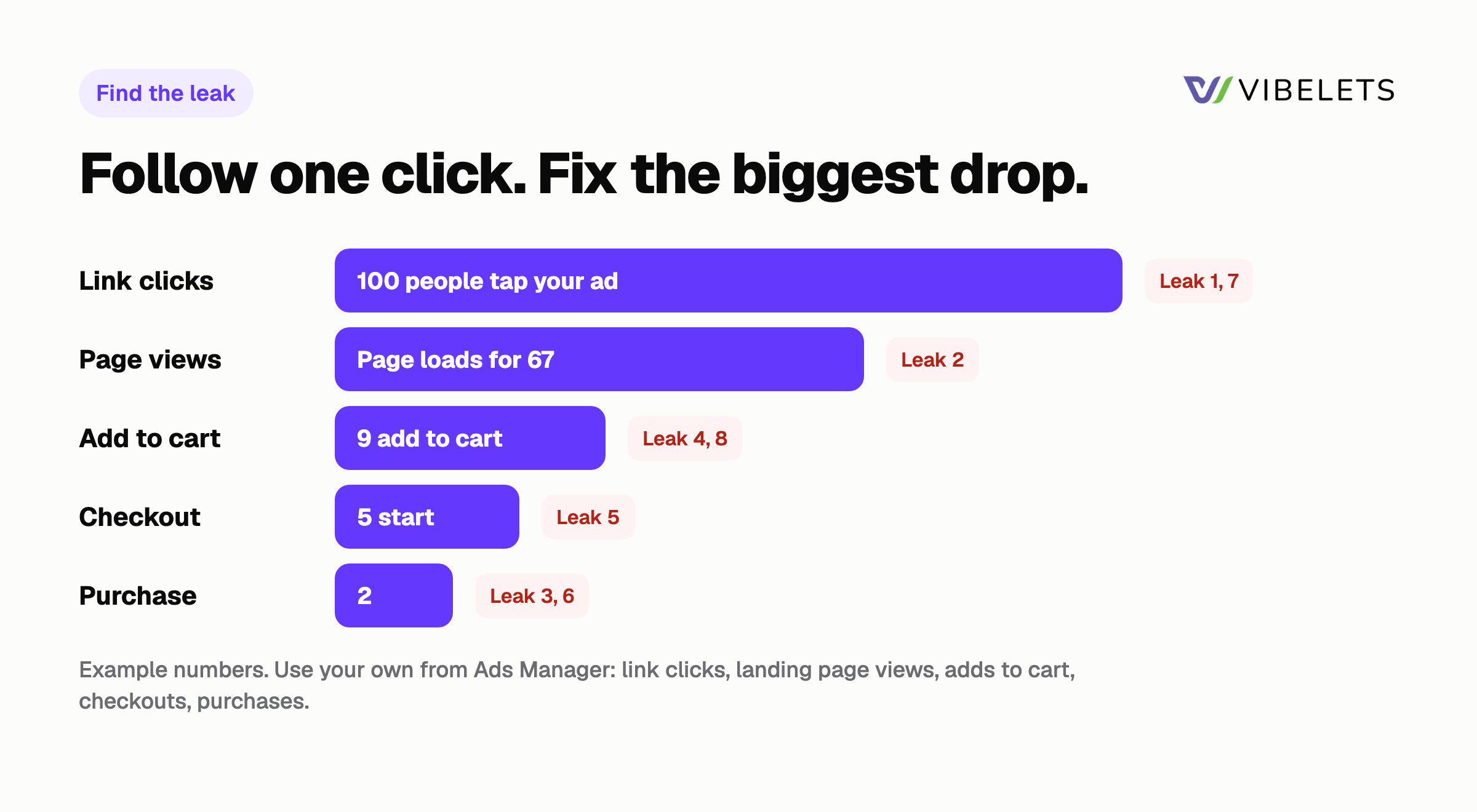
| Step | Compare | Big drop here? Look at |
|---|---|---|
| Ad to click | Link CTR | Leak 1 (the ad) or 7 (placements) |
| Click to page | Landing page views / link clicks | Leak 2 (the page doesn’t load) |
| Page to cart | Adds to cart / landing page views | Leak 4 (page doesn’t match) or 8 (no reason to buy) |
| Cart to checkout | Checkouts / adds to cart | Leak 5 (price shock) |
| Checkout to purchase | Purchases / checkouts | Leak 3 (checkout breaks in the app) |
| Meta vs Shopify | Meta purchases vs Shopify orders | Leak 6 (tracking) |
A rough guide many advertisers use: if fewer than about 7 in 10 link clicks become landing page views, the page is too slow or the clicks are low quality. It is a rule of thumb, not a Meta number. Your own ad sets are a better benchmark: the same drop on every ad set points to the store, a drop on 1 ad set points to that ad or audience.
The 8 leaks
Leak 1: The ad gets the wrong click
Some ads get lots of cheap clicks from people who were never going to buy: a funny hook with no product, a giveaway feel, a “click to see” tease. High CTR, low adds to cart.
Fix: show the product and the price (or the offer) in the first 3 seconds. A slightly lower CTR from people who know what they’re clicking on is worth more than cheap curiosity clicks. Check that your enhancements are off (see step 02 above).
Leak 2: The click never becomes a page view
People tap, wait, and leave before the page loads. Meta still charges for the click. Big gap between link clicks and landing page views.
Fix: send ads to the product page, not the home page. Remove apps you don’t use (each one can add scripts to every page), compress large images and videos above the fold, and remove pop-ups that fire in the first seconds. Test the link inside Instagram again after each change.
Leak 3: Checkout breaks inside the Instagram app
Your buyer is inside Instagram’s own browser, not Safari. Merchants report wallet buttons (Apple Pay, Shop Pay) missing, logins failing and blank screens there. In Shopify analytics, look at sessions and conversion rate by browser: in-app traffic often shows up as “Mobile Safari UI/WKWebView” or similar.
Fix: place a real test order inside the app (you can refund it). Make sure card payment works without a wallet. If a checkout or upsell app breaks in the in-app browser, turn it off and test again. If in-app conversion is far below Safari and Chrome, consider a simpler checkout path and fewer steps before payment.
See which ads get clicks that never buy. Vibelets reads your ad account every week and flags ads, ad sets and placements with clicks but no purchases, with the reason and a suggested fix. Nothing goes live until you approve it.
Leak 4: The page doesn’t match the ad
The ad shows a red hoodie at 30% off. The page opens on a grey one at full price, and the discount is hidden in the cart. People bounce because it feels like the wrong place.
Fix: the first screen of the page should repeat the ad: same product, same colour, same offer, same words. If you run 3 different angles, consider 3 links (or the right variant pre-selected) instead of one generic page.
Leak 5: Price shock at checkout
Adds to cart look fine, then people leave at checkout. The usual reason is a surprise: shipping cost, taxes, or delivery time that shows up only at the last step.
Fix: show shipping cost and delivery time on the product page, next to the button. If you have a free shipping threshold, say it there (“Free shipping over $60”). Remove any required account creation before payment.
Leak 6: Meta can’t see your sales
If Meta doesn’t receive your purchase events correctly, it can’t find more buyers and it optimizes on the wrong signal. Signs: Meta shows far fewer purchases than Shopify has orders from Meta traffic, or far more (counted twice).
Fix: in Shopify, open the Facebook & Instagram app, then Settings, then Data sharing, and check the level. In Events Manager, open the Purchase event, check the Diagnostics tab and the Event Match Quality score (Meta suggests 6.0 or higher). Make sure your campaign optimizes for Purchase, not link clicks or add to cart. Full steps in check 2 of the weekly Meta ads checklist.
Leak 7: The money goes to placements that click but don’t buy
Some placements bring cheap clicks and almost no purchases. With placements left open, Meta decides where your budget goes.
Fix: Ads Manager, Breakdown, By delivery, Placement. For each placement, note share of spend, link clicks and cost per purchase. If one placement takes a big share of spend with clicks and no purchases, exclude it as a test for 7 days and compare. Don’t cut placements on one day of data.
Leak 8: There’s no reason to buy now
The page loads, the product is right, and people still leave. They don’t trust it yet, or they don’t need it today.
Fix: put proof right next to the button: star rating and review count, a real customer photo, the return policy in one line. Give an honest reason to buy now: a real sale end date, a bundle, a gift. With Black Friday and Cyber Monday close, a clear deal with a real end date is the easiest version of this.
Printable leak finder
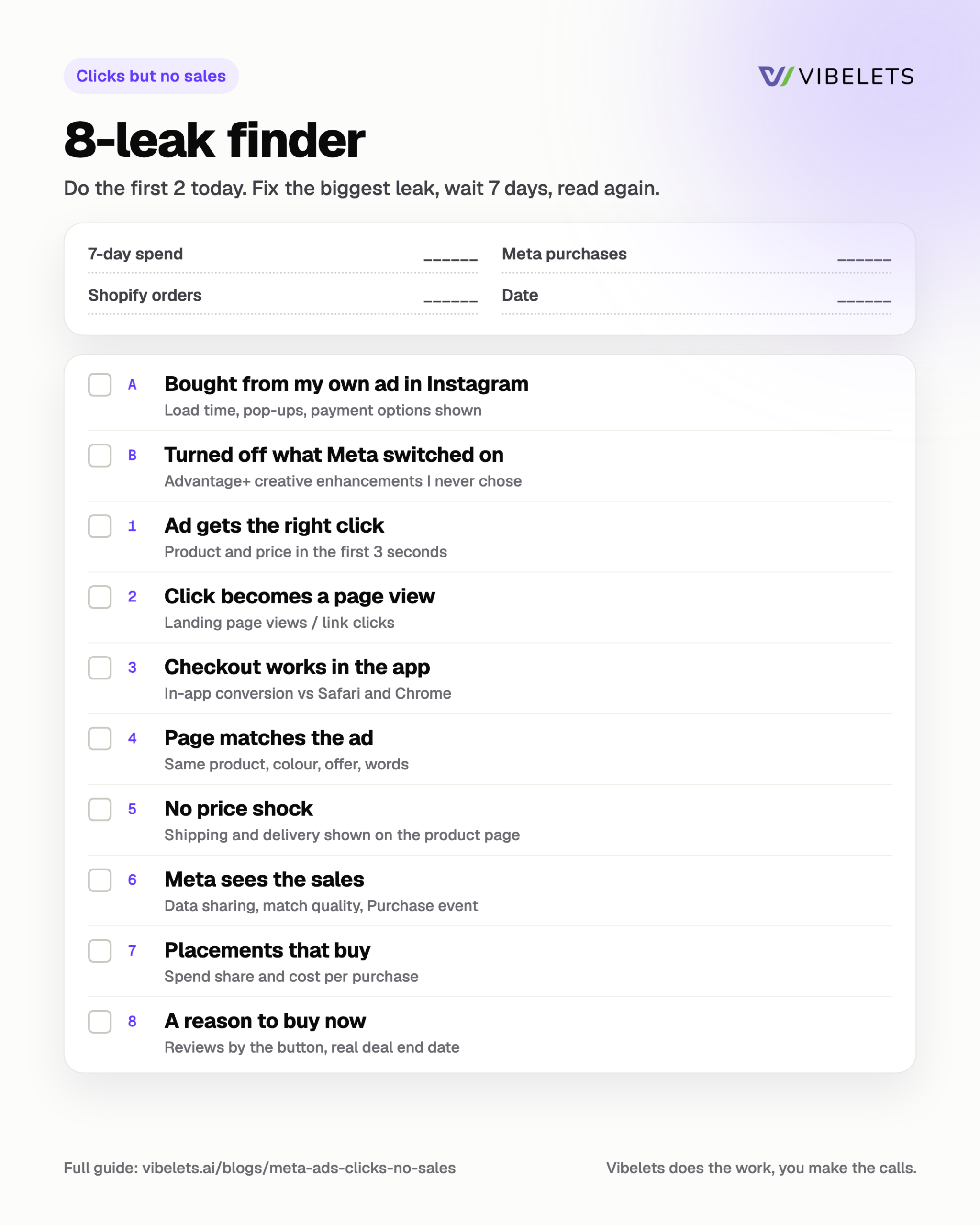
Date ____ Last 7 days spend ____ Meta purchases ____ Shopify orders from Meta ____
| Done | Check | What to write down |
|---|---|---|
| [ ] | Bought from my own ad inside Instagram | Load time, pop-ups, payment options shown |
| [ ] | Meta enhancements checked | What was on, what I switched off |
| [ ] | 1. Ad gets the right click | Product and price in first 3 seconds? CTR vs adds to cart |
| [ ] | 2. Click becomes a page view | Landing page views / link clicks |
| [ ] | 3. Checkout works in the app | In-app conversion vs Safari/Chrome, test order result |
| [ ] | 4. Page matches the ad | Same product, colour, offer, words on first screen? |
| [ ] | 5. No price shock | Shipping and delivery shown on product page? |
| [ ] | 6. Meta sees the sales | Data sharing level, match quality, optimization event |
| [ ] | 7. Placements that buy | Spend share and cost per purchase by placement |
| [ ] | 8. Reason to buy now | Reviews near button, return line, real deal end date |
Fix the biggest leak first, wait 7 days, then read the funnel again. Fixing everything at once means you won’t know what worked.
Copy-paste prompts for Claude or ChatGPT
Export the last 7 days from Ads Manager at ad set level with the funnel columns above, attach it, then paste one of these.
From the attached Ads Manager export (last 7 days, ad set level), work out these rates for each ad set: landing page views / link clicks, adds to cart / landing page views, checkouts / adds to cart, purchases / checkouts. Show the step with the biggest drop for each ad set, and say whether the same drop shows on every ad set (a store problem) or only one (an ad problem).Here is my product page text and my top ad's text: [paste both]. List every place where the page doesn't match the ad (product, colour, offer, price, words). Then rewrite the first screen of the page so it repeats the ad's promise in under 25 words.From the attached placement breakdown (last 7 days), list each placement's share of spend, link clicks, purchases and cost per purchase. Flag any placement with more than 15% of spend and a cost per purchase above $[40]. Suggest one placement test for next week and how to read it.Two ways to fix it
Option 1: Do it yourself
Print the leak finder. Do the 2 first checks today, then follow the funnel and fix the biggest leak. Read it again in 7 days. Free.
Option 2: Let Vibelets find it
Connect your Meta ad account. Vibelets audits it, shows where clicks stop turning into sales, and each week writes a plan of what to pause, test and launch. It runs only the changes you approve. Meta only, and it never promises a ROAS or CPA.
Start your 14-day free trial
Built for Shopify and DTC brands: Vibelets for ecommerce.
FAQ
How many clicks before I should expect a sale?
It depends on your price and your store, so use your own numbers. Work out your break-even CPA (average order value x contribution margin, for example $50 x 40% = $20). If an ad has spent 2 x that ($40) with zero purchases, it has had a fair chance. Pause it or test a fix.
Meta says I got sales, but Shopify doesn’t show them. Who is right?
Shopify counts every real order. Meta credits sales by its attribution setting (a click or view within a set window), so some gap is normal. A big gap either way usually means a tracking problem: see leak 6.
Should I just make new ads?
Not until you’ve checked the store. If the drop is after the click (page, cart or checkout), new ads will send more people into the same leak. New ads fix leak 1. The other 7 are on the store side or in your settings.
Can I send people out of the Instagram browser?
Some apps try to open your store in the phone’s main browser. Test carefully: an extra step can lose people too. Start by making the in-app checkout work, then compare.
Related guides
- Meta ads checklist for Shopify: 9 weekly checks
- How to audit a Facebook ad account
- How to run a clean Facebook ad creative test
Sources
Checked 21 November 2026.
- Meta Business Help Center: About event match quality
- Meta Business Help Center: About deduplication for Meta Pixel and Conversions API events
- Shopify Community: Conversion rate issue in Mobile Safari UI/WKWebView
- Shopify Community: Store works in Chrome but white screen in Facebook/Instagram in-app browser