

Meta & Facebook Ads
12 min read

AI image tools will happily generate your product. They'll also happily misspell your label, bend your bottle, and light the scene from 2 directions at once. These 6 free Claude skills run the static-ads pipeline the honest way: your real product composited into generated scenes, every word human-made, and a fidelity gate before anything spends.
This is the AI-generation sibling of the creative pack's static-ad-brief: that skill briefs a human designer; this pack IS the designer. Both paths end at the same naming convention and the same testing skills, and the AI UGC pack is the moving-picture sibling with the same philosophy.
Props imply claims. A steam-and-towel scene says spa-grade without words, and if the claim can't be said, don't stage it.
Key takeaways
The product in the ad is the product in the box: label-visible images default to compositing the real packshot into the generated scene, never generating a lookalike, and the source kit's macro label shot becomes the QC ground truth
The prompt is a formula, not a vibe: placement, surface, environment, lighting recipe, camera, props, style register, negatives, written in your tool's dialect, with 1 lighting recipe per set so every composite matches
Formats are recognition machines: 7 proven layouts, each split absolutely into what AI generates and what the editor adds, mapped to awareness (cold runs us-vs-them, feature callout, native; warm runs hero and review card)
Every word is human-made: on-image text is written by people and added in the editor: hook 7 words or fewer, contrast 4.5:1, the squint test at 15% zoom, and generated text anywhere in the image is a QC kill
Nothing spends before the gate: 10 checks against the ground truth at 3 zoom levels, PASS / FIX / KILL, and label garble is always a KILL, because a warped label is your brand wearing someone else's face
The designer path vs the generation path
Same brief discipline, different executor. Pack #3's static-ad-brief hands the work to a human; this pack hands it to an image model, and adds the gates that difference requires.
Designer path (pack #3) | Generation path (this pack) | |
|---|---|---|
The brief | Written for a human designer | Written as an 8-part prompt, in your tool's dialect |
The product | Shot by a photographer | Your real cutout, composited into the scene |
The words | Typeset by the designer | Still typeset by a human, in the editor; generated text is a kill |
A new scene | A reshoot or a mockup round | A prompt edit, on the same lighting recipe |
The failure mode | Slow turnaround | Garbled labels, impossible shadows, color drift |
The exit | Compliance check | Compliance check + the 10-check artifact gate |
Both paths end identically: the same [product]-[angle]-[hook#]-static-v# naming, the same test matrix, the same verdicts.
The prerequisite: photos and an image tool
No connectors required
Every output is a prompt, a layout spec, or a QC sheet for the image tool you already use: Gemini image and Nano Banana class editors, GPT Image, Flux, or Seedream, each spoken in its own dialect. Paste mode everywhere.
A handful of real product photos
The source kit is the foundation: an angle set, 1 macro label shot (it becomes the QC ground truth), a color reference, and clean cutouts. Twenty minutes with a phone and a window covers most SKUs.
Works with the packs, stands alone without them
Sale overlays arrive briefed from the BFCM pack and get produced here. The brand-system pack slots its brand DNA block into every prompt when installed; without it, the prompt system carries a lightweight inline fallback.
STAGE 1 OF 4
Prep: fidelity first, scenes second
01 · product-fidelity-guard · free skill
Your SKU, not a plausible cousin of it
This skill starts where every AI product shot should: with the real product. It builds the source kit (an angle set, a macro label shot, a color reference, and clean cutouts) and then makes the honesty-critical decision per planned image: COMPOSITE (the real cutout drops into a generated scene, the default whenever the label is readable), REPLACE (generate the scene with a stand-in, then swap the real plate over it), or FULL-GENERATION (allowed only when the product is small, background, or label-unreadable).
The rule with no exceptions: label-visible images are never fully generated, because image models approximate text and an approximated label is a different product. The macro label shot doubles as the ground truth every downstream QC check compares against, which is why it's shot first, not last.
SAY THIS TO CLAUDE
> Here are 9 photos of our serum. Build the source kit and call composite vs generate for each planned image.
Cadence: once per SKU, then per new packaging · Mode: paste the product photos02 · scene-and-prop-planner · free skill
The scene is an argument; the props are its evidence
This skill plans the image grid before any prompt is written: 6 to 10 images per product across hero (clean field), context (in its habitat), detail (the texture or mechanism), and lifestyle (the buyer's world), each mapped to the angle it serves and the season it ships in. A mechanism angle gets detail-heavy coverage; a social-proof angle gets lifestyle.
Props are chosen as claims: a steam-and-towel scene says spa-grade, a gym bag says portable, a windowsill of plants says natural, and the skill's rule cuts both ways: if the claim can't be said out loud, don't stage it visually. Maximum 2 to 4 props per scene, because past that the product stops being the subject.
SAY THIS TO CLAUDE
> Plan the scene grid for the serum: mechanism angle, autumn drop. Props that earn their claims.
Cadence: per product per season or angle · Mode: paste the angle + product notesSTAGE 2 OF 4
Generate: the formula and the formats
03 · product-shot-prompt-system · free skill
The prompt is a formula spoken in your tool's dialect
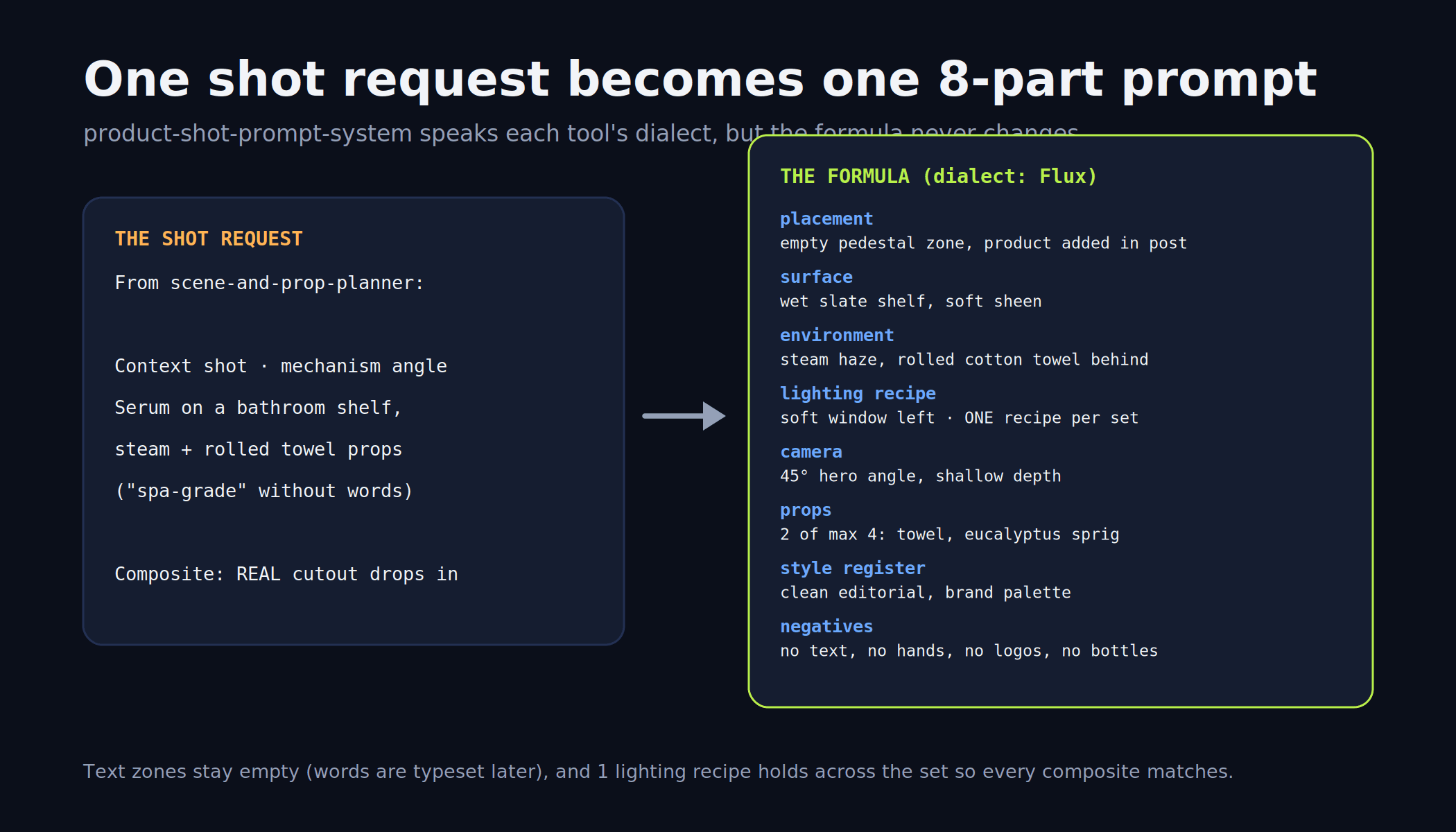
Every shot request becomes an 8-part prompt: placement (where the real product will land), surface, environment, lighting recipe, camera, props, style register, and negatives, then gets translated into the dialect of the tool you actually use: Gemini image and Nano Banana class editors, GPT Image, Flux, or Seedream, because the same intent is phrased differently per model.
Two disciplines run through every set: 1 lighting recipe per set, so composited products match their scenes and images sit together in a carousel without visual whiplash; and text zones left deliberately empty, because the words come later, from humans, in the editor. When the brand-system pack is installed its brand DNA block slots in automatically; without it, a lightweight inline fallback carries palette and register.
SAY THIS TO CLAUDE
> Write the scene prompts for these 3 shots. We generate in Flux; 1 lighting recipe across the set.
Cadence: per image set · Mode: paste the shot plan + tool name04 · static-format-library · free skill
Statics win on recognition, so use the formats feeds already read
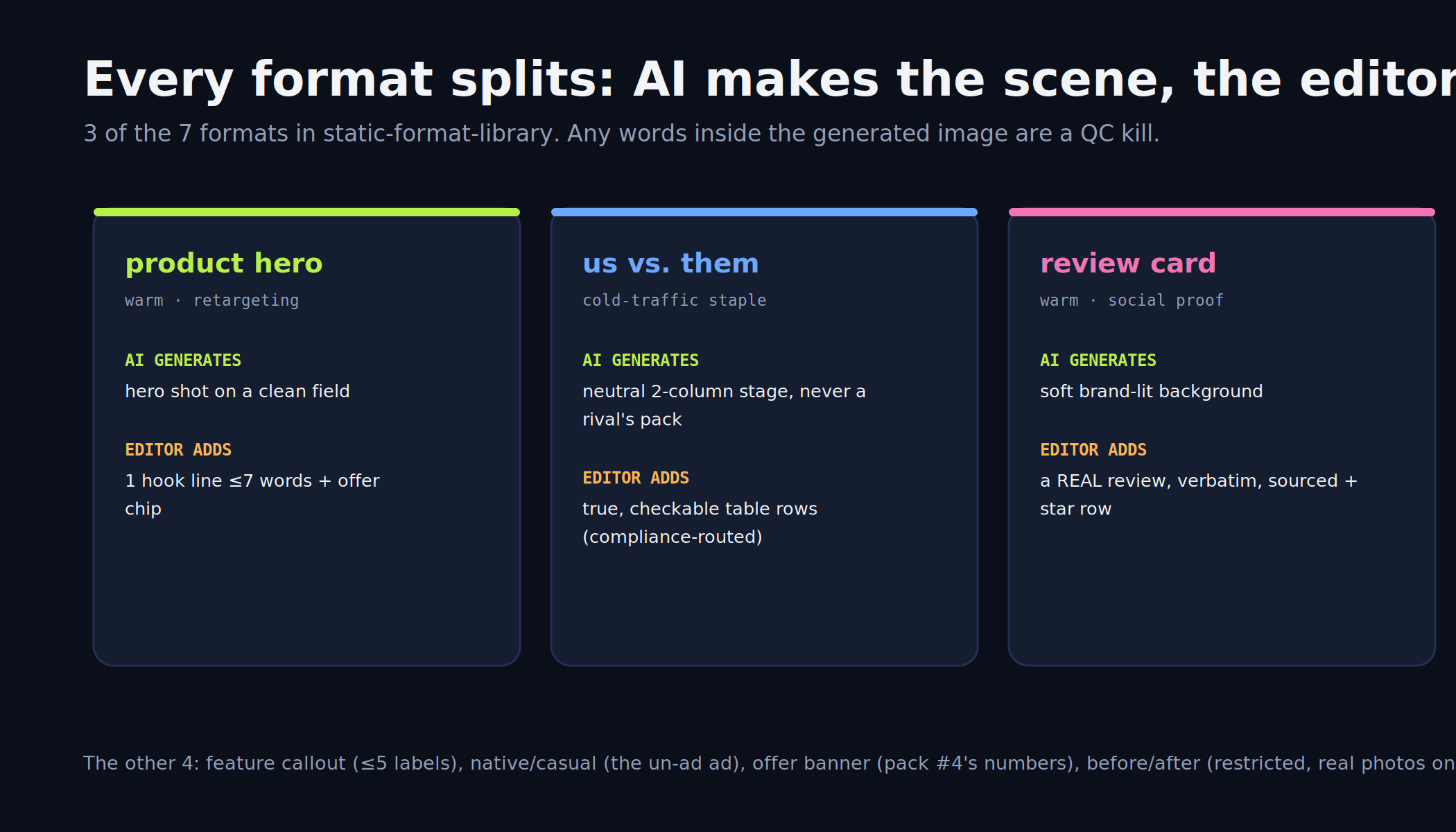
Seven proven layouts, each specified as zones with an absolute split between what the model generates and what the editor adds: product hero (generated hero shot; editor adds 1 hook line and an offer chip), us-vs-them (a neutral 2-column stage, never a rival's identifiable pack; the editor adds true, checkable table rows routed through the compliance check), feature callout (product centered; 3 to 5 editor labels with leader lines), review card (soft brand-lit background; a real review, verbatim, sourced, because AI never writes a customer quote), native/casual (the un-ad ad in a lived-in scene), offer banner (a large clean text zone for the sale pack's numbers), and before/after, a restricted class that defaults to DON'T in personal-attribute categories and demands real photography where it's legitimate.
The skill picks 2 to 3 formats per angle by awareness stage (cold: us-vs-them, callout, native; warm: hero, review card; promo: banner), specs 2 variants per format so the test has a variable, and names everything [product]-[angle]-[hook#]-static-v# for the system.
SAY THIS TO CLAUDE
> Make statics for this product: cold traffic, objection-flip angle. Which formats, and what does the editor add?
Cadence: per angle you produce · Mode: paste the angle + awareness stage
This pack writes the prompts and the specs. Vibelets presses generate.
Vibelets runs the whole pipeline as a product: it reads your store, generates the finished static creatives, and stages them to Meta for your approval.
STAGE 3 OF 4
Finish: human words on generated scenes
05 · overlay-and-text-rules · free skill
Every word on the image was typed by a person
The pack's hardest line: on-image text is written by humans and added in the editor, never generated, because model-made lettering warps and a warped word costs more trust than no word. The overlay spec per image: a hook of 7 words or fewer doing one job, support text of 10 or fewer, a hierarchy of at most 3 text levels, and contrast of at least 4.5:1 against the actual pixels behind it.
Then the placement rules: the squint test at 15% zoom (if the hook isn't legible, it shrinks or the background simplifies), 9:16 safe zones keeping the top 14% and bottom 20% clear of UI, and the old 20%-text guidance treated as taste rather than policy: less text usually wins, but nothing is auto-rejected for it.
SAY THIS TO CLAUDE
> Write the overlay spec for these 3 passed scenes: hook, support, chip, zones for 1:1 and 9:16.
Cadence: per passed image set · Mode: paste the images + the copy sourceSTAGE 4 OF 4
Gate: the 10-check artifact scan
06 · image-artifact-qc · free skill
A warped label is your brand wearing someone else's face
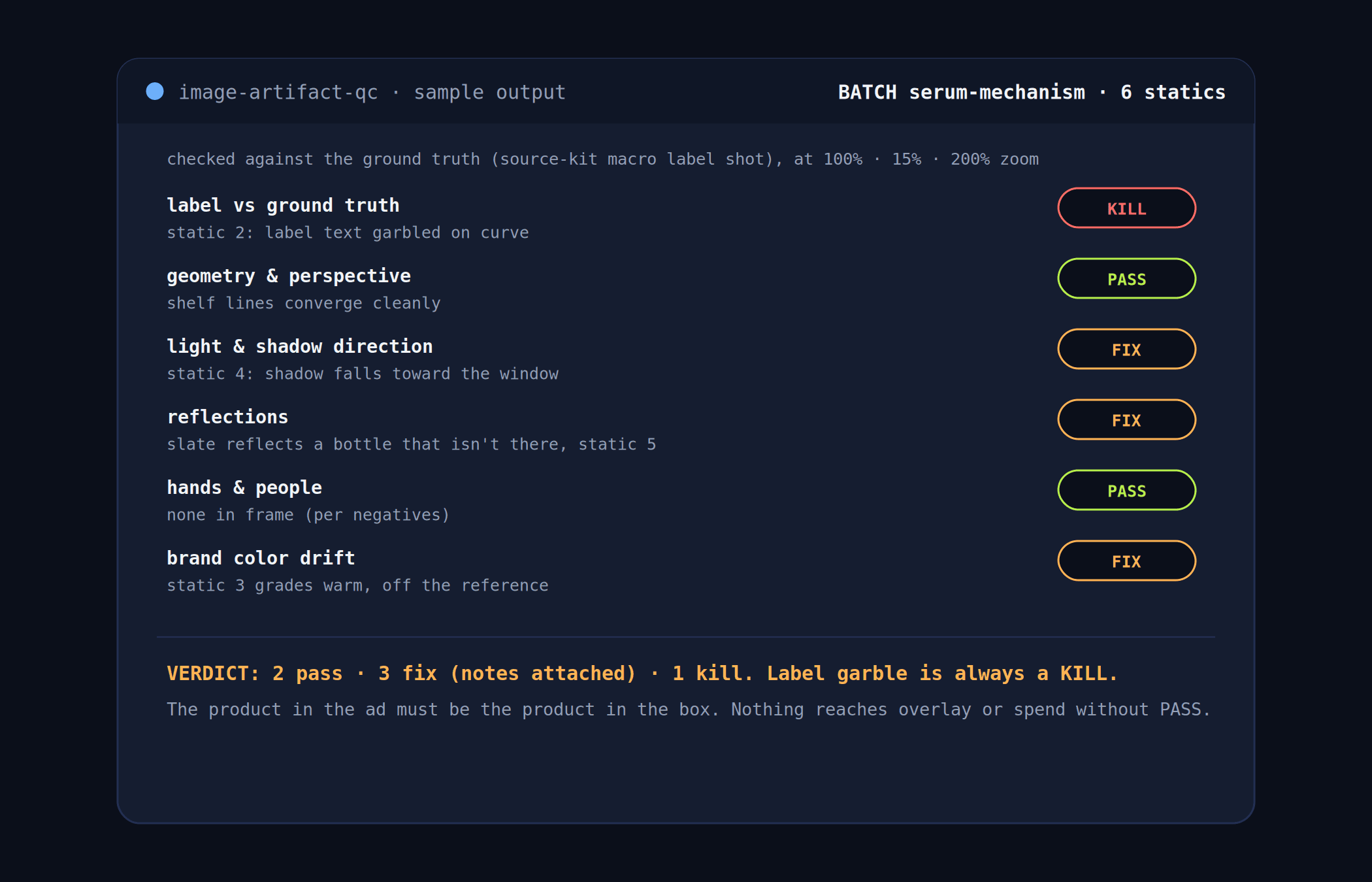
Before anything reaches overlay, testing, or spend, every image runs 10 checks against the source kit's ground-truth label shot, at 3 zoom levels: 100% for the honest first look, 15% for the feed's-eye view, 200% for the seams. The checks cover label fidelity, geometry and perspective, light and shadow direction, reflections, hands and people, prop coherence, color drift against the brand reference, composite edges, background logic, and text contamination.
Verdicts are per image: PASS, FIX (with the note attached: re-grade, re-comp the shadow, crop the seam), or KILL, and 2 kills are automatic: garbled label text and any generated words in the image. The artifact log feeds back into the prompt library, so the same failure stops recurring, and only a fully PASSED set moves on to the creative pack's test matrix.
SAY THIS TO CLAUDE
> QC these 6 statics against the label ground truth before anything spends.
Cadence: every batch, before overlay and spend · Mode: paste the images + the source kit
The truth rules every skill follows
The product in the ad is the product in the box: label-visible images composite the real photo, never a generated lookalike. Props imply claims, so a claim that can't be said doesn't get staged. Review cards use real reviews, verbatim and sourced; AI never writes a customer quote. And on-image text is human-written and editor-added, everywhere, always: generated text is a QC kill, not a style choice.
Setup in 5 minutes
1
Shoot the source kit
An angle set, 1 macro label shot, a color reference, clean cutouts. A phone and a window are enough for most SKUs.
2
Install the skills
On claude.ai or desktop: Settings → Capabilities → Skills, upload the pack (grab it free from the pack folder; see Anthropic's skills repository for how uploads work). In Claude Code: copy the folders into ~/.claude/skills/.
3
Run the loop in order
Fidelity call, scene grid, prompts in your tool's dialect, formats, overlays, gate. Each skill names the next one in its output.
Rather skip the pipeline entirely? Vibelets generates the finished statics end to end: it reads your store, creates the images, and stages them to Meta for your approval.
Frequently asked questions
Which image tools does this work with?
The prompt system speaks the dialects of the current generation of tools: Gemini image and Nano Banana class editors, GPT Image, Flux, and Seedream, and the formula itself (placement, surface, environment, lighting recipe, camera, props, style register, negatives) is tool-agnostic. Everything runs in paste mode; no connector is required.
Why composite the real product instead of just generating it?
Because image models approximate text, and an approximated label is a different product wearing your name. Label-visible images always composite the real cutout into the generated scene, the macro label shot serves as QC ground truth, and full generation is reserved for shots where the product is small, background, or label-unreadable.
Do these skills write the ad copy on the image?
No, deliberately: every on-image word is human-written and added in the editor, with the overlay skill enforcing the hook and support limits, contrast, and safe zones. Generated text anywhere in the image is an automatic QC kill. The words themselves come from your angle map, the creative pack's copy skills, or you.
Which formats should I start with?
Match the awareness stage: cold traffic runs us-vs-them, feature callout, and native/casual; warm traffic runs product hero and review card; promos run the offer banner. The library specs 2 to 3 formats per angle with 2 variants each, so the test matrix always has a clean variable.
Can I make before/after statics?
It's the restricted class in the library: in personal-attribute categories (skin, weight, body) the default is DON'T. Where a before/after is legitimately usable, both frames must be real photographs, not generated, and the pair goes through the compliance check before anything else happens.
How does QC work on generated images?
Every image is compared against the ground-truth macro label shot at 100%, 15%, and 200% zoom across 10 checks: label fidelity, geometry, light direction, reflections, hands, props, color drift, composite edges, background logic, and text contamination. Verdicts are PASS, FIX with the note attached, or KILL, and garbled labels and generated text are always kills.
Sources
Meta Ad Library (public competitor ad archive): https://www.facebook.com/ads/library/
Meta Business Help Center, About the Learning Phase: https://www.facebook.com/business/help/112167992830700
Anthropic, Agent Skills overview: https://platform.claude.com/docs/en/agents-and-tools/agent-skills/overview
Anthropic, public skills repository: https://github.com/anthropics/skills
Make ads that sell
your Products.
Generate on-brand product ads in minutes, no designer or brief required.
Trusted by 400+ growing brands