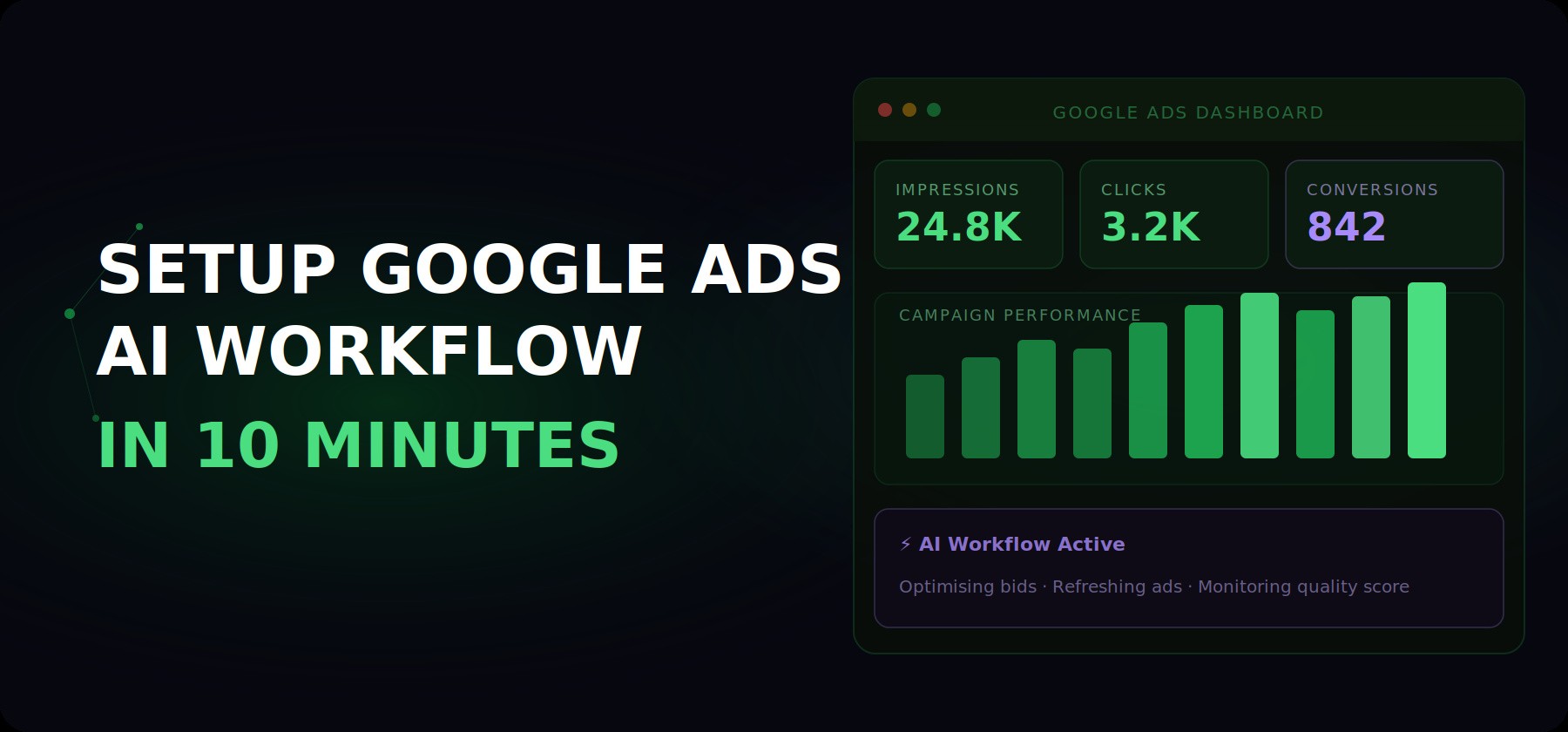
The best Google Ads managers aren't working harder than their competitors.
They built one prompt, tested it three times, and now run the same task in
minutes instead of hours.
Here's exactly what that looks like. From a single prompt template, Claude
does four things your team currently spends hours on every week:
WHAT CLAUDE DOES — FROM ONE PROMPT
→ Picks up your account data and processes it the way an analyst would
→ Applies your brand constraints and format rules automatically
→ Generates structured, labelled output ready to use immediately
→ Runs the same way every single time — no briefing, no rework
WHAT CLAUDE DOES — FROM ONE PROMPT
→ Picks up your account data and processes it the way an analyst would
→ Applies your brand constraints and format rules automatically
→ Generates structured, labelled output ready to use immediately
→ Runs the same way every single time — no briefing, no rework
WHAT CLAUDE DOES — FROM ONE PROMPT
→ Picks up your account data and processes it the way an analyst would
→ Applies your brand constraints and format rules automatically
→ Generates structured, labelled output ready to use immediately
→ Runs the same way every single time — no briefing, no rework
RSA variants. Negative keywords. Search term summaries. Performance
commentary. All of it. Consistent. In minutes. The workflow compounds every
time you use it.
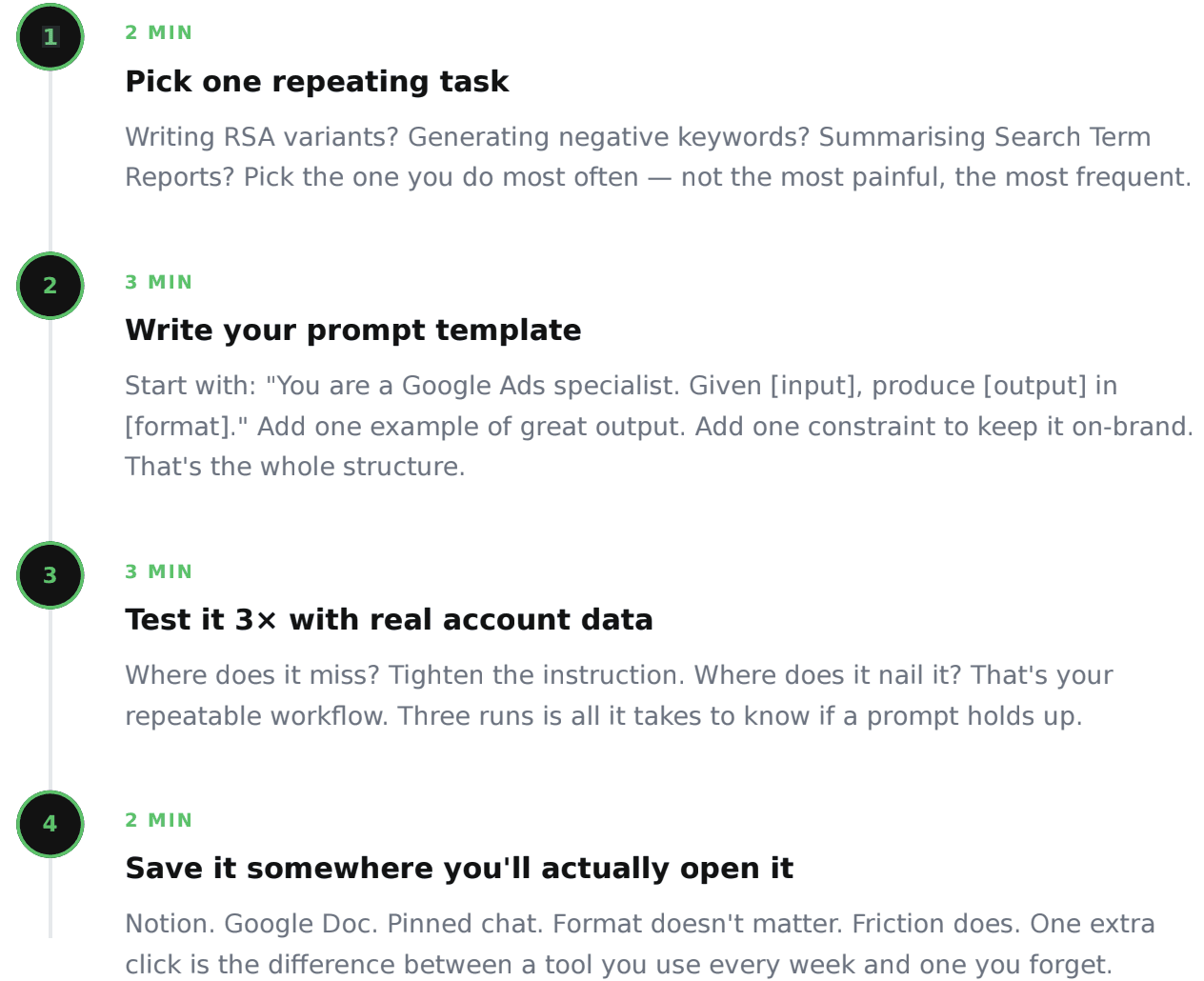
Follow these 4 steps — total time: 10 minutes
Why most Google Ads managers never automate
It's not a lack of tools. It's that the setup feels complicated — people assume
they need code, a developer, or a complex integration. They don't.
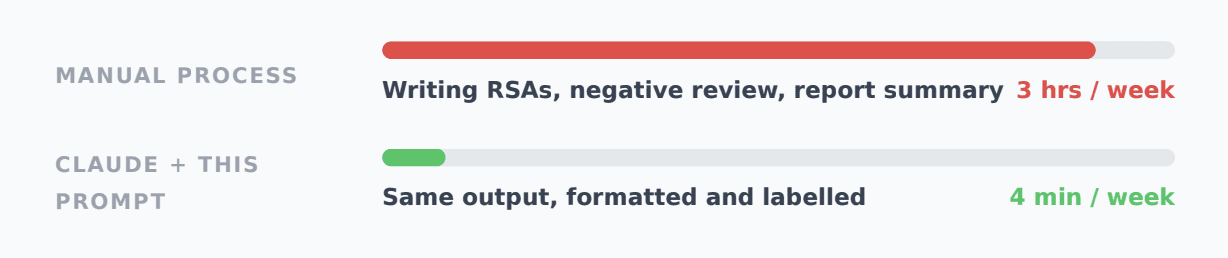
The result? Most managers run the same tasks manually every week. The
managers pulling ahead built one prompt and now run it in 4 minutes instead
of 3 hours.
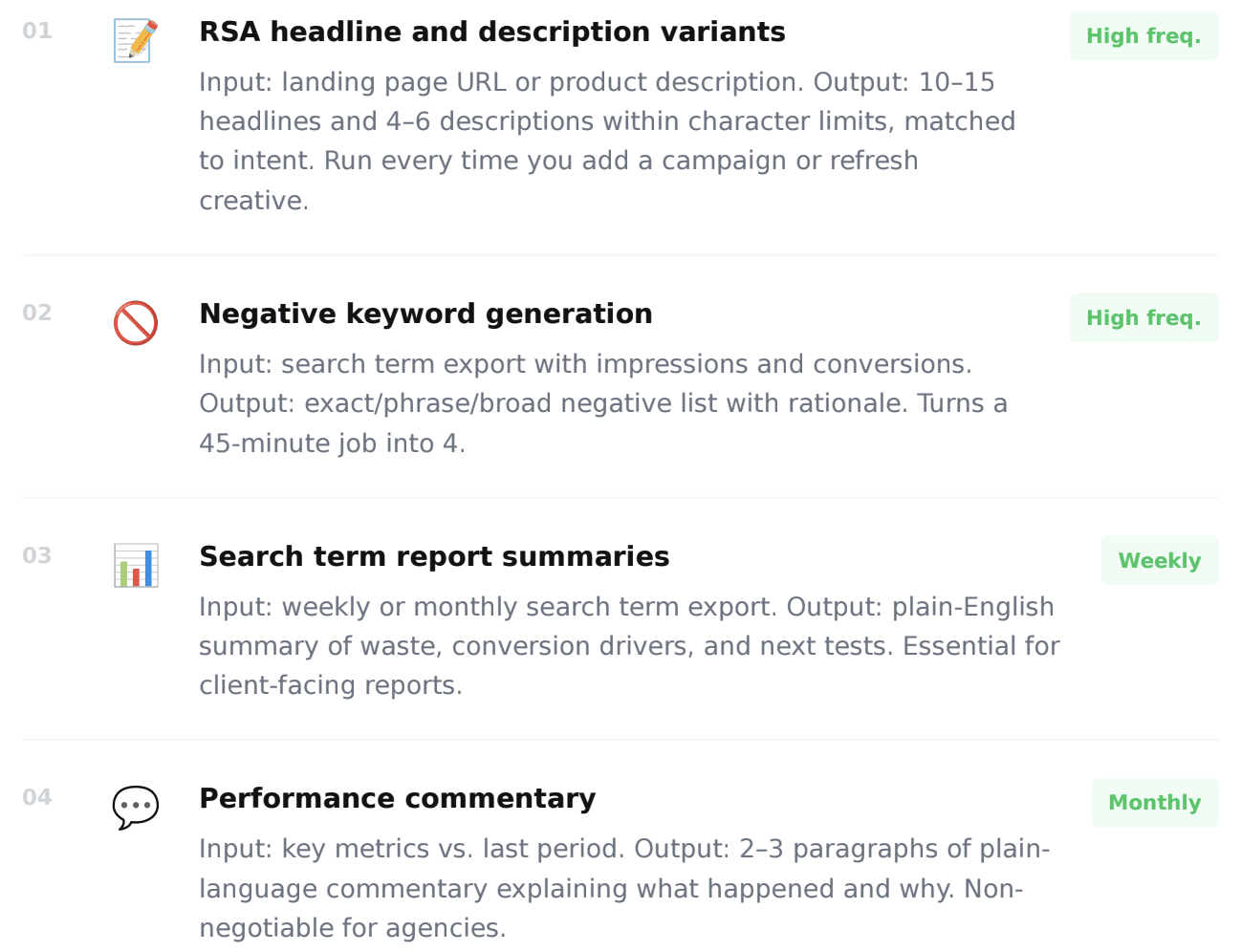
The 4 Google Ads tasks worth automating first
Not all repeating tasks have the same payoff. These four give the highest
return — high frequency, clear format, and low need for human judgment in
the first draft.
What the prompt actually does
Here's the exact sequence Claude runs when you use this template. Each
step builds on the last — the output is structured, not a random dump of
suggestions.
01 Reads your input data
Claude takes your raw account data — search terms, performance
numbers, existing copy — and processes it the same way an analyst would,
looking specifically for the patterns that drive performance.
02 Applies your account constraints
From your prompt, Claude picks up character limits, brand tone, match type rules,
and format requirements. Not generic output — output shaped specifically to your
account.
03 Generates structured variations
For each input, Claude writes multiple complete, usable variations across the angles
you specify — giving you a real set to test, not a single suggestion to
tweak manually.
04 Labels and formats the full output
Every output is tagged by type and formatted ready to paste into your workflow —
clean enough to hand directly to a client or use in a brief without editing.
The prompt (copy this exactly)
Paste this into Claude with your account data. Replace only the words in
brackets — everything else is intentional.
PROMPT — PASTE INTO CLAUDE · REPLACE THE BRACKETS

# Google Ads Workflow Generator
You are an expert Google Ads specialist with deep experience
in direct-response paid search.
Your task: Given the input below, produce
[OUTPUT TYPE — e.g. RSA headlines / negative keyword list]
that I can use immediately in my account.
Step 1 — Analyse the input
Read the data and identify the key patterns relevant to
[YOUR TASK]. Focus on what drives performance, not surface
observations.
Step 2 — Generate structured output
Produce [NUMBER] variations using these angles:
- [Angle 1 — e.g. Pain point focus]
- [Angle 2 — e.g. Benefit-led]
- [Angle 3 — e.g. Urgency/FOMO]
Each output = one complete, immediately usable item.
Step 3 — Format as a ready-to-use file
CATEGORY: [description]
→ [Label] | [Output copy]
→ [Label] | [Output copy]
# Rules:
# - Follow Google Ads character limits exactly
# - Brand tone: [YOUR TONE — e.g. direct, professional]
# - No generic phrases ("best in class", "industry-leading")
# - Every item must be immediately usable without editing
# - Vary structure and rhythm across the full set
Input data:
[PASTE YOUR DATA HERE]
PROMPT — PASTE INTO CLAUDE · REPLACE THE BRACKETS
# Google Ads Workflow Generator
You are an expert Google Ads specialist with deep experience
in direct-response paid search.
Your task: Given the input below, produce
[OUTPUT TYPE — e.g. RSA headlines / negative keyword list]
that I can use immediately in my account.
Step 1 — Analyse the input
Read the data and identify the key patterns relevant to
[YOUR TASK]. Focus on what drives performance, not surface
observations.
Step 2 — Generate structured output
Produce [NUMBER] variations using these angles:
- [Angle 1 — e.g. Pain point focus]
- [Angle 2 — e.g. Benefit-led]
- [Angle 3 — e.g. Urgency/FOMO]
Each output = one complete, immediately usable item.
Step 3 — Format as a ready-to-use file
CATEGORY: [description]
→ [Label] | [Output copy]
→ [Label] | [Output copy]
# Rules:
# - Follow Google Ads character limits exactly
# - Brand tone: [YOUR TONE — e.g. direct, professional]
# - No generic phrases ("best in class", "industry-leading")
# - Every item must be immediately usable without editing
# - Vary structure and rhythm across the full set
Input data:
[PASTE YOUR DATA HERE]PROMPT — PASTE INTO CLAUDE · REPLACE THE BRACKETS
# Google Ads Workflow Generator
You are an expert Google Ads specialist with deep experience
in direct-response paid search.
Your task: Given the input below, produce
[OUTPUT TYPE — e.g. RSA headlines / negative keyword list]
that I can use immediately in my account.
Step 1 — Analyse the input
Read the data and identify the key patterns relevant to
[YOUR TASK]. Focus on what drives performance, not surface
observations.
Step 2 — Generate structured output
Produce [NUMBER] variations using these angles:
- [Angle 1 — e.g. Pain point focus]
- [Angle 2 — e.g. Benefit-led]
- [Angle 3 — e.g. Urgency/FOMO]
Each output = one complete, immediately usable item.
Step 3 — Format as a ready-to-use file
CATEGORY: [description]
→ [Label] | [Output copy]
→ [Label] | [Output copy]
# Rules:
# - Follow Google Ads character limits exactly
# - Brand tone: [YOUR TONE — e.g. direct, professional]
# - No generic phrases ("best in class", "industry-leading")
# - Every item must be immediately usable without editing
# - Vary structure and rhythm across the full set
Input data:
[PASTE YOUR DATA HERE]How to use the output
Getting structured output is step one. Here's how to turn it into actual account improvements.
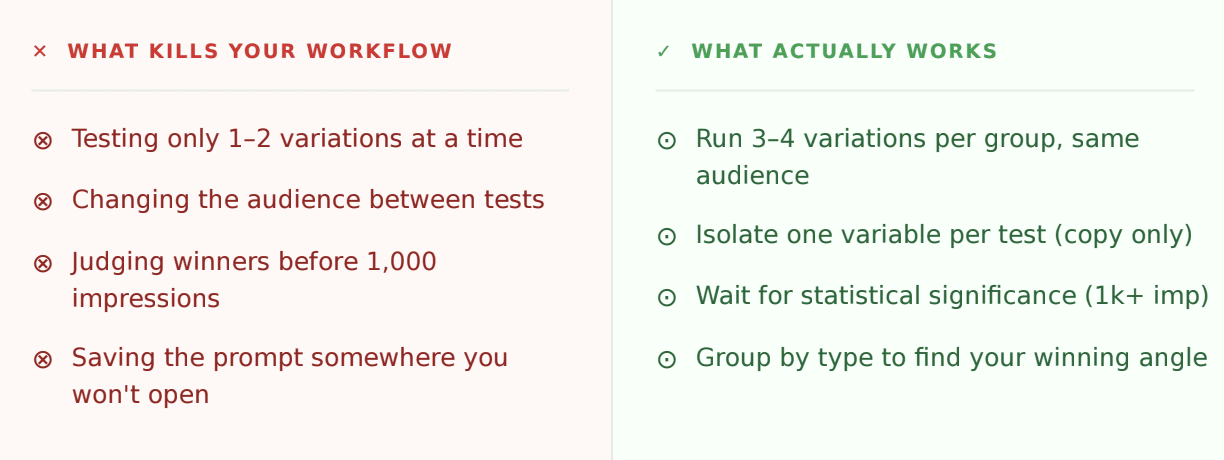
THE TEST ING FRAMEWORK
Run 3–4 variations per ad group, targeting the same audience. After 3–4
weeks and roughly 1,000 impressions each, pause the bottom performers by
CTR or conversion rate. Reinvest into the winner. Repeat until you have a clear
best per category
THE TEST ING FRAMEWORK
Run 3–4 variations per ad group, targeting the same audience. After 3–4
weeks and roughly 1,000 impressions each, pause the bottom performers by
CTR or conversion rate. Reinvest into the winner. Repeat until you have a clear
best per category
THE TEST ING FRAMEWORK
Run 3–4 variations per ad group, targeting the same audience. After 3–4
weeks and roughly 1,000 impressions each, pause the bottom performers by
CTR or conversion rate. Reinvest into the winner. Repeat until you have a clear
best per category
What you're building is a signal factory. Each test tells you not just which
ad performed, but which angle resonates with which audience. That data
compounds over time.
Avoid these mistakes
The real advantage
The managers using this aren't replacing their Google Ads expertise. They're
offloading the volume problem to Claude so their expertise has more
material to work with.
Your instincts about which angle performs still matter. But now you're
choosing between 50 data points instead of 5. And you're backing your
instinct 10× faster than your competitors.
1 task automated = 1 hr / week = 50 hrs / year
1 task automated = 1 hr / week = 50 hrs / year
1 task automated = 1 hr / week = 50 hrs / year
More workflows = more signal = winning accounts faster.
That's the whole game.