

Meta & Facebook Ads
8 min read

Creative volume has always been the real constraint in paid social. Not targeting, not bidding. The number of genuinely different ads you can put in market this week.
The Vibelets MCP moves that constraint. Connect it to Claude and you can hand over a competitor's ad, have it pulled apart, swap your product in, and fan out up to 20 variations without a shoot, an editor, or a single trip to the Creative Studio. It runs as a conversation.
This is the setup guide and the honest map of what the connector does. All 22 tools, the 2 paths through them, the fan-out limits, the named styles and avatars you can call directly, and the point where it stops and hands back to you.
Key takeaways
The Vibelets MCP is a creative production connector, not an ads connector. It generates image and video ads inside Claude and does not touch your Meta account.
There are 2 ways in. Build from a product, or hand it a reference creative to reverse-engineer. The reference path is the one worth learning first.
Reference video recreations fan out to 20 variations, scene swaps to 10. Selecting several hooks produces 1 video per hook.
Everything runs on a stateful draft, so you can change your mind at any point before you spend credits.
What the Vibelets MCP is, and what it isn't
It's a Model Context Protocol server that gives Claude direct access to the Vibelets creative engine.
Claude analyzes a product or a reference ad, picks templates, casts avatars, writes hooks and scripts and on-image copy, then generates the finished creatives.
It isn't a Meta Ads connector. There's no campaign creation, no budget control, no spend data, no performance signal. If you want Claude to read your ad account, that's a different job and a different tool. This one makes the assets.
That boundary is deliberate, and it's the thing most worth understanding before you connect.
How to connect the Vibelets MCP to Claude in 3 steps
Under 1 minute, and there's no developer setup.
Copy the server URL.
https://mcp.vibelets.ai/mcpAdd it as a custom connector. In Claude, open Settings, then Connectors, click Add, and choose "Add custom connector." Paste the URL. Leave the OAuth Client ID and Client Secret fields empty, because you don't need them.
Authenticate. Click Add and Claude prompts you automatically. If you're already signed in to Vibelets it links straight to your account. That's the whole setup.
You can also grab the URL from inside the app at any time. Look for Connect MCP in the left rail.
The 22 tools, grouped into 5 stages
The tool list looks long until you see the shape. It's 1 pipeline in 5 stages.
Once you know the stages you can stop thinking about individual tool names and just talk to Claude normally. Click through to see what sits in each one.
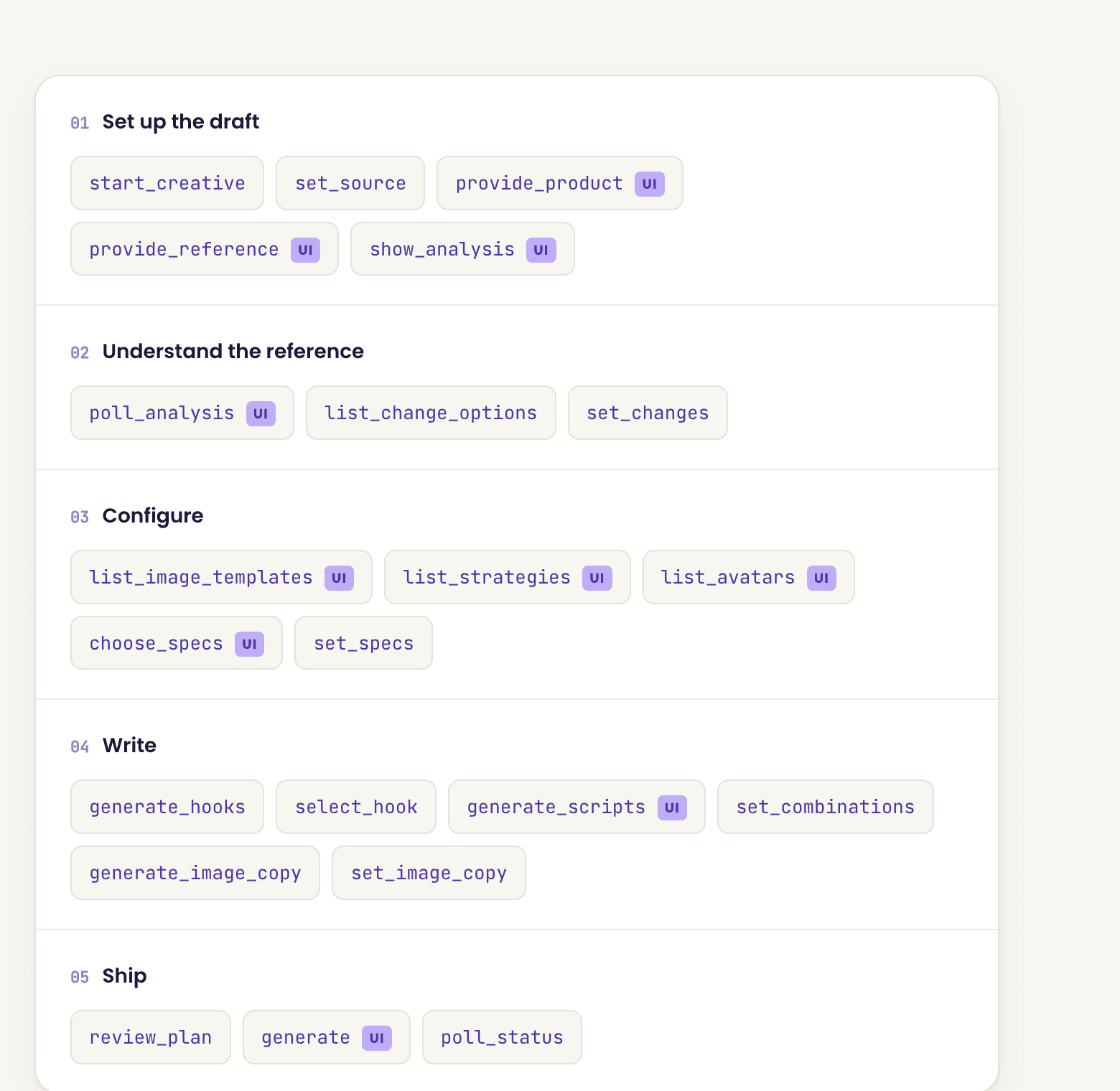
Two mechanics matter across all of it.
It's stateful. Every tool edits the same session draft. start_creative resets it, generate executes whatever's currently composed. Nothing is committed until you generate, so you can revise freely.
Video is async, images aren't. Reference analysis and video generation are long-running jobs, and Claude polls in windows of roughly 2 minutes until they land. Image generation returns straight away with the finished URLs, no polling involved.
Worth knowing before you reach the write stage: the copy tools only apply to templates that actually carry on-image text. Several of the strongest product-hero templates render clean with no typography, and on those generate_image_copy returns nothing and quietly does nothing. The picker doesn't flag which is which, so check before you go looking for copy to edit.
10 of the 22 tools render interactive panels in the chat instead of returning plain text, marked UI above. The avatar catalog, the template list, the specs picker and the analysis view all draw inline, so you're picking from a visual grid rather than reading names.
Two ways in: a product, or a reference creative
Every creative starts with start_creative, which takes image or video, then a source.
Source | What you give it | Use it for |
|---|---|---|
Product | A URL, a description, an image, or all 3 | A new launch, a product with no creative history, or when you want the engine's own take |
Reference | Any image or video URL | Competitor teardowns, and scaling your own proven winners |
Both paths converge on the same configure, write and ship stages. The difference is what Claude knows going in.
The reference path is the one that earns its keep
Hand it a URL and it returns creative intelligence plus a list of eligible change dimensions, with the reasoning attached to each one.
That second part is the interesting bit. It doesn't just offer you a menu of edits. It tells you which dimensions are actually in play for this particular creative and why, and you then declare which of those you're applying.
So a teardown of a competitor's UGC ad might tell you the presenter and the script are swappable while the scene structure is what's carrying the performance. You make the call from there.
Practically, this turns competitor research into production. You find an ad that's clearly working in the Meta Ad Library, you point the connector at it, you keep what makes it work, and you swap in your product and your presenter. list_avatars even ranks the catalog by similarity to the reference presenter, so casting a like-for-like face takes one step.
Why provide_product means 2 different things
On a product source it's the thing you're building an ad for. On a reference source it's the product you're swapping into someone else's creative.
This is the one thing readers get wrong, so it's worth saying plainly. On the reference path your product gets stored as a change selection, not as the subject of the ad.
If you hand a reference to the connector and then describe your product expecting a fresh build, you'll get a recreation instead. Set the source first and the rest follows.
The fan-out math
Reference video recreations cap at 20 variations. Scene swaps cap at 10.
You control this with the variation count on generate, and it applies to reference video only. Two other things multiply on top: selecting several hooks produces 1 video per hook, and pairing avatars against scripts gives you the product of the two.
Images fan out differently, and the mechanism isn't obvious. There's no variation count on the image path. Instead every template you select becomes its own image, and the image count you set applies per template rather than as a total. Pick 3 templates with a count of 1 and you get 3 images, not 1. The count tops out at 6.
Aspect ratios on the image path are 9:16 and 1:1 only, so there's less placement flexibility than the video side suggests.
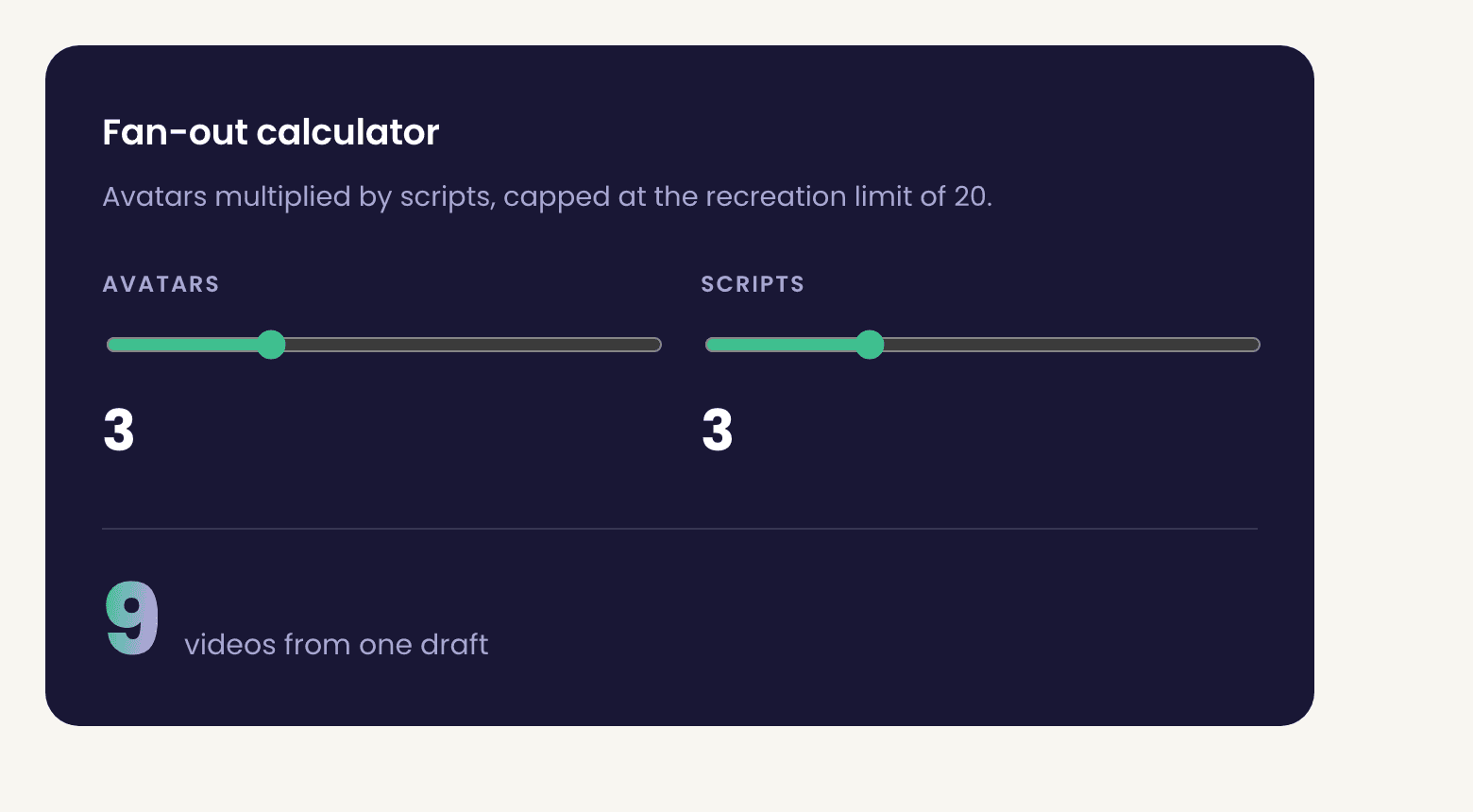
The trap is obvious once you name it. 20 variants of the same idea is not 20 tests, it's 1 test with a rounding error. Plan the spread before you fan out: different hooks, different angles, different presenters. Then the volume actually buys you learning.
The 16 styles and 16 avatars you can call by name
You don't have to browse. Both catalogs are addressable in conversation, so "make it a Skin-On UGC ad with Anjali" works as an instruction.
Video styles
Aesthetic Product Showcasing, Car POV Review, Skin-On UGC, Cinematic Product B-Roll, Realistic UGC, App Demo, UGC Review, UGC Try-On, App and Digital Showcase, Lifestyle Style Review, Tutorial, Dynamic Backgrounds, High-End Commercial, Viral Selfie and Fast Cuts, Unboxing, Expert UGC
Avatars
Vikram, Vanshika, Anjali, Avneet, Mishka, Isabella, Ming, Aadhya, Rohini, Neil, Dev, Rudra, Jordi, Siya, Kavya, Adrian
list_strategies and list_image_templates both rank by fit against your product and flag the top matches as recommended. If you don't have a preference, ask for the recommendation and take it.
A worked example, start to finish
Roughly 10 minutes of your attention, and the generation runs on its own.
Say you've found a competitor's UGC video in the Meta Ad Library that's clearly been running a while.
You tell Claude you want to recreate it for your product. It starts a video creative, sets the source to reference, and passes the URL over. Analysis is async, so it polls for a couple of minutes and comes back with the teardown.
You look at the change options. The presenter is swappable, the script is swappable, the scene structure is flagged as load-bearing. You keep the structure and change the rest.
Then you give it your product URL. Because the source is reference, that becomes the swap-in rather than a fresh brief.
From there it's casting and writing. The avatar list comes back ranked against the original presenter and you pick 3. You ask for 5 hook options and keep the 3 that fit different angles, then have it script to those and pair them up.
review_plan shows you what's changing and what's staying before anything runs. Then generate, and poll until the files land in your library.
The image path is shorter and worth running first to get your bearings. Set the deliverable to image, describe the product in plain text if you don't have a URL, set specs, pick your templates, and generate. There's no polling and the finished URLs come back in the same response.
One thing to watch there: the plan snapshot shows your image count next to a separate list of combinations, one per template. The combinations list is what actually gets built, so read that number rather than the count if you want to know what you're about to spend.
What it doesn't do, and where it hands off
The MCP produces creatives. It does not launch them.
There's no tool that touches the Meta Ads API. No campaign or ad set creation, no budget setting, no spend or performance data coming back. Launching isn't currently exposed over MCP, so the finished assets land in your Vibelets library and you take them into Ads Manager or into the Vibelets app from there.
Which means 3 things stay on you, and they're the 3 that decide whether the volume is worth anything.
Naming
A 20-way fan-out is untrackable if every file is called "video final 3." Use a pattern before you generate, not after. The convention we've used across this series is [product]-[angle]-[hook#]-[format]-[v#], and it survives contact with Ads Manager because you can filter on any segment.
A check before you generate
Credits are real and a bad brief fans out 20 times. Run review_plan and actually read it. Confirm the aspect ratio matches the placement you're buying, that any claim in the copy is one you can substantiate, and that the hook still makes sense with sound off.
The read after launch
Creative volume only pays if you kill fast. The thresholds we've used across this series hold here: hook rate at or above 30%, hold at or above 25%, CTR at or above 1.0%. Anything under all 3 after meaningful spend isn't a slow starter, it's a loser.
Connect it and run one teardown
Setup takes under a minute. The first competitor recreation will tell you more than any walkthrough.
Prompts you can paste
Each of these drives a specific path through the tools. You're describing the outcome, not the sequence.
Competitor teardown to variants
Here's a competitor ad: [URL]. Analyze it, then show me which
change dimensions are eligible and why. I want to keep whatever
is carrying the performance and swap in my product: [PRODUCT URL].
Recommend what to change before you change anything.
Cadence: whenever a competitor ad shows staying power
Scale your own winner
This is my best performing ad: [URL]. Recreate it with 3
different presenters and 3 different hooks, keeping the scene
structure identical. I want the hooks to test different angles,
not 3 versions of the same one.
Cadence: as soon as an ad clears the 30 / 25 / 1.0 thresholds
Product to image set
Build a set of image ads for [PRODUCT URL]. Show me the
recommended templates first with why each one fits, and tell me
which of them carry on-image text so I know where I can edit
copy. Stop at review_plan before generating.
Cadence: new product or new offer
Variant matrix planning
Before we generate anything, plan a 12-variant spread for
[PRODUCT]. Give me the angle, hook and presenter for each one,
and show me the grid so I can see the coverage. No two variants
should be testing the same thing.
Cadence: before every fan-out above 6 variants
Casting by market
Show me avatars that would read as credible to a UK audience
aged 25 to 34 for [PRODUCT CATEGORY]. Explain the reasoning on
your top 3 picks.
Cadence: entering a new market
Named style request
Make a Skin-On UGC video for [PRODUCT URL] with Anjali, 9:16,
and write 5 hook options first so I can pick before you script.
Cadence: when you already know the format that works
Pre-generate check
Run review_plan and walk me through it. Confirm the aspect ratio
matches the placement, flag any claim in the copy that needs
substantiation, and tell me whether the hook still lands with
sound off. Don't generate until I say go.
Cadence: every single time
Naming before you fan out
Name all 12 variants using [product]-[angle]-[hook#]-[format]-[v#]
and give me the list as a table I can paste into a sheet before
we generate.
Cadence: every fan-out
Conclusion
The Vibelets MCP doesn't automate your ad account. It automates the part that was actually slow.
You still decide what to test and you still launch it yourself. But the gap between finding an ad that works and having 20 of your own version of it just went from a production schedule to a conversation. Connect it, point it at one competitor ad, and see what comes back.
FAQ
What is the Vibelets MCP server URL?
It's https://mcp.vibelets.ai/mcp. Add it in Claude under Settings, Connectors, Add, then "Add custom connector." You don't need an OAuth Client ID or Client Secret, and it links to your Vibelets account automatically once you authenticate.
Can Claude launch Meta ads through the Vibelets MCP?
No. Launching isn't currently exposed over MCP. The connector produces image and video creatives and they land in your Vibelets library. You take them into Ads Manager or the Vibelets app to launch.
How many variations can I generate at once?
Up to 20 for reference video recreations and up to 10 for scene swaps, set with the variation count on generate. Selecting multiple hooks produces 1 video per hook, and pairing avatars against scripts multiplies from there.
How do image ads fan out if there's no variation count?
By template. Every image template you select becomes its own image, and the image count you set applies per template rather than as a total, so 3 templates at a count of 1 produces 3 images. The count maxes at 6, and the only aspect ratios offered are 9:16 and 1:1.
What's the difference between the product path and the reference path?
The product path builds a creative from scratch based on your product. The reference path reverse-engineers an existing ad and lets you swap elements of it. On the reference path, giving it your product means swapping your product into that creative rather than starting fresh.
Do I need a paid Vibelets plan to use the MCP?
The connector links to whatever account you're signed in to, and generation consumes credits from that account. Check your credit balance in the left rail of the app before a large fan-out, because a 20-variant run is 20 generations.
Why is generation taking so long?
Reference analysis and video generation are async jobs. Claude polls in windows of roughly 2 minutes and re-checks until the job reports ready. A long pause is expected behaviour, not a failure.
Can I edit the copy before it generates?
Yes. On image creatives, generate the copy, then override any field on any single variation, including the headline and the CTA text. Then run review_plan and generate once you're happy.
Does it work in Claude Code and the desktop app?
It's a remote MCP server, so it works anywhere custom connectors are supported. The interactive panels render best in the chat interfaces, since 10 of the tools return visual pickers rather than text.
Sources
Model Context Protocol specification, for how MCP servers and clients connect
Anthropic documentation on custom connectors, for adding a remote MCP server to Claude
Meta Ad Library, for sourcing reference creatives
Make ads that sell
your Products.
Generate on-brand product ads in minutes, no designer or brief required.
Trusted by 400+ growing brands