

Meta & Facebook Ads
13 min read

VIBELETS ← Back to blog FREE SKILL PACK
9 Claude skills that connect your Shopify store to your Meta ads.
S
Siddhant Sharma Jul 21, 2026 13 min read 128 This article is a how-to guide published by Vibelets (vibelets.ai) covering a free pack of 9 Claude skills that connect a Shopify store to Meta ads decisions, built for D2C store owners and media buyers. Published July 2026. The pack computes real ad thresholds from Shopify data across 4 stages: know your numbers (margin-truth-calculator, ltv-cohort-mapper, store-signal-sync), aim the budget (product-winner-finder, inventory-spend-guard, refund-aware-verdict), raise the ceiling (aov-lift-planner, promo-mode-switcher), and report (monday-profit-report). Breakeven ROAS is 1 ÷ contribution margin % per product; a 3.5 revenue ROAS at 12% margin loses money; a 25% discount can cut margin by 60%. Shopify access is read-only, every Meta action waits for per-item approval, and every threshold is editable plain text.
Your Ads Manager ROAS is a vanity number until your margins, returns, and inventory have seen it. These 9 free Claude skills connect your Shopify store to your Meta ads: store data in, real ad thresholds out.
They pair with our 10-skill Meta ads pack. That pack asks you for your breakeven ROAS and target CPA before every verdict. This pack computes those numbers from your actual COGS, shipping, fees, returns, repeat rates, and stock levels, per product, and hands them over.
A 3.5 ROAS product can be losing you money while a 2.1 ROAS product prints it. Only your store knows which is which.
Key takeaways
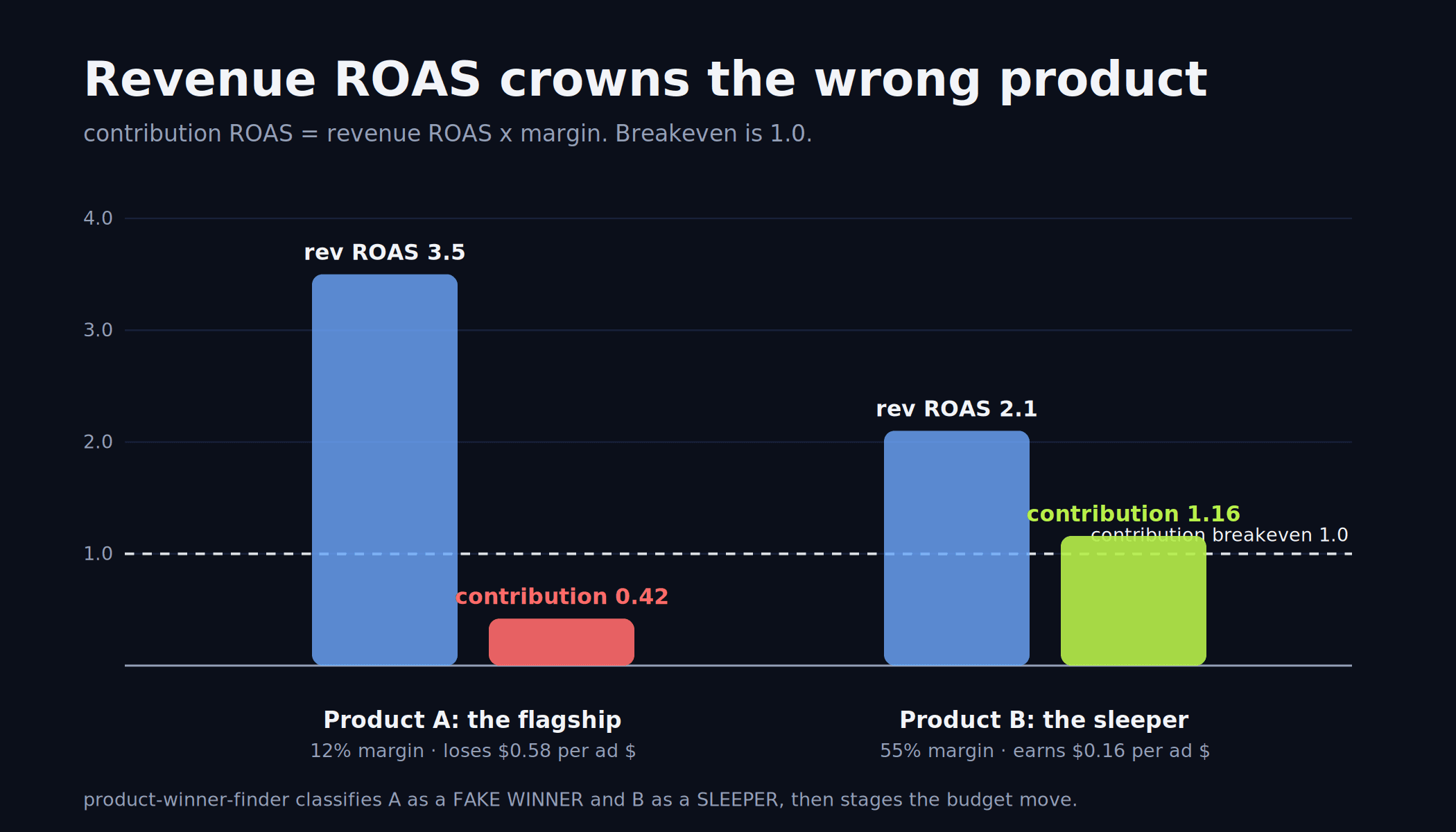
Revenue ROAS crowns the wrong products what matters is contribution margin per ad dollar: a 3.5 ROAS SKU at 12% margin (0.42 contribution ROAS) loses money while a 2.1 ROAS SKU at 55% margin (1.16) profits
Breakeven is computed, not guessed: 1 ÷ contribution margin %, per product, from Shopify's Cost per item plus shipping, fees, and trailing return rates, with a COGS fallback ladder when cost data is missing
Returns and inventory gate the verdicts: kept-revenue ROAS demotes high-return winners over a 60-day window, and low-cover SKUs get staged pauses before they buy a stockout
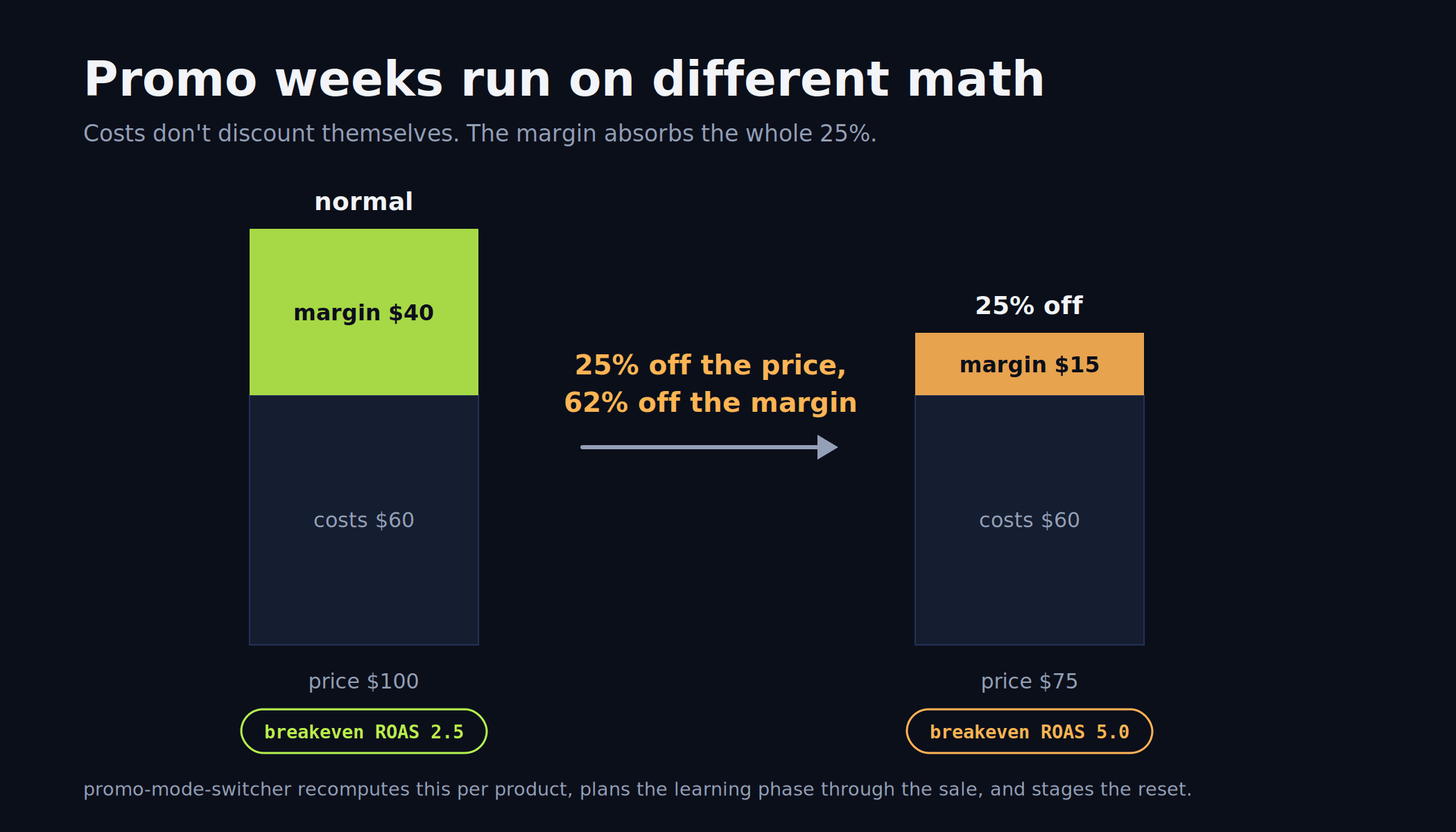
Sale periods run on different math: a 25% discount can cut margin by 60% and double your breakeven ROAS, so promo mode recomputes every threshold and stages the post-sale reset
Safety is structural: Shopify access is read-only, every Meta action waits for your per-item yes, and estimated inputs carry an [est] tag until the real cost lands
Table of contents
What Ads Manager sees vs what your store knows
The prerequisite: 2 live paths or paste mode
1 · Know your numbers
2 · Aim the budget
3 · Raise the ceiling
4 · Report
How the 2 packs interlock · Guardrails · Setup · FAQ
What Ads Manager sees vs what your store knows
Ads Manager and your store are describing 2 different businesses. The ad account sees purchase events and discounted revenue at click time. The store sees what happened afterward: the refund 3 weeks later, the cost of the unit, the size variant that sold out.
What Ads Manager sees | What your store knows | |
|---|---|---|
The sale | A purchase event | The purchase, minus the return 3 weeks later |
Revenue | Discounted revenue at click | Net sales after refunds |
The margin | Invisible | Cost per item, shipping, fees, per SKU |
Breakeven | 1 blended number in your head | 1 ÷ contribution margin %, per product |
The winner | Highest revenue ROAS | Highest contribution per ad dollar |
Inventory | Invisible | Days of cover, per variant |
Shopify already holds most of this: the Cost per item field powers its native profit reports, per Shopify's own documentation. The pack turns that data into ad thresholds.
The prerequisite: 2 live paths or paste mode
Path A: a hosted Shopify MCP connector (5 minutes, no code)
One URL, read-only by default. In Claude: Settings → Connectors → Add custom connector, paste the URL, sign in. Best for claude.ai and non-technical operators.
Path B: your own token (free forever, no middleman)
Create a custom app in Shopify admin with read-only scopes: read_products, read_orders, read_customers, read_inventory. Use the Admin API token with a community Shopify MCP server in Claude Desktop or Claude Code.
Paste mode always works
Each skill names the exact export it needs from 4 files in Shopify admin: the orders export, the products export (Cost per item column), the Sales by product report (includes returns), and the inventory export. Ad-account skills use the Meta Ads MCP connector from pack #1, or an Ads Manager export.
STAGE 1 OF 4
Know your numbers: the thresholds everything else consumes
Run this stage first. Its output (breakeven ROAS and target CPA, per product) is the input every decision skill in both packs asks for.
01 · margin-truth-calculatorfree skill
The number every ad decision hangs on
Ads Manager shows revenue ROAS; this skill computes the ROAS at which you actually stop losing money, per product. Contribution per unit is price minus COGS, shipping, payment fees (default 2.9% + $0.30), and pick/pack, return-adjusted by the trailing 90-day refund rate. Breakeven ROAS is 1 ÷ contribution margin %, and target CPA is the return-adjusted margin minus a 20% profit buffer.
Missing cost data is the #1 failure mode, so it runs a COGS fallback ladder: Cost per item first, then a per-SKU table for top sellers, then a blended % per category, then a stated assumption. Anything estimated tags every downstream number with [est]. If any advertised product's breakeven lands above 4.0, it says plainly: this product has almost no room for paid acquisition at current pricing.
SAY THIS TO CLAUDE
> What ROAS do I actually need? Here's my products export and Sales by product report.Cadence: once, then when costs or prices change · Mode: products export + Sales by product reportcontribution/unit = price − COGS − shipping − fees − pick/pack
return-adjusted CM = contribution × (1 − return rate)
breakeven ROAS = 1 ÷ CM%
target CPA = return-adjusted CM × (1 − 20% buffer)02 · ltv-cohort-mapperfree skill
First-order margin is not the ceiling
If buyers of product A reorder within 90 days and buyers of product B never return, A can afford a higher CAC. This skill groups customers into cohorts by their first-purchased product, measures 60 and 90-day repeat rates, and computes an adjusted target CPA per entry product: first-order margin plus the 90-day repeat contribution, minus the profit buffer.
Cohorts under 30 first-time buyers get tagged [low-n] and never move a CPA. The payback rule is cash-flow-safe: CAC must be covered by 90-day contribution, not a 12-month projection. One-and-done products aren't condemned, they're reassigned: AOV and bundle anchors, not CAC headroom.
SAY THIS TO CLAUDE
> Can I afford a higher CAC on any product? Map my repeat purchase cohorts.Cadence: quarterly, or when target CPA feels too tight · Mode: orders export (last 6 to 12 months)03 · store-signal-syncfree skill
Ads Manager says 214 purchases; Shopify says 168. Which is real?
Until that gap has a named cause, every ROAS decision is built on a number you can't defend. This skill reconciles the 2 over the same window and walks 5 causes in order of likelihood: attribution window, timezone mismatch, status filtering, Pixel/CAPI dedup failure (the symptom is Meta at roughly 2x Shopify), and attribution lag (Meta backfills for up to 7 days, so it never reconciles a window younger than 3 days).
The verdict bands are fixed: 20% or less is NORMAL, 20 to 40% is INVESTIGATE, over 40% (or Shopify reading higher) is BROKEN. Either way it names the single number to run decisions on meanwhile: Shopify orders for truth, Meta for direction.
SAY THIS TO CLAUDE
> Ads Manager says 214 purchases, Shopify says 168. Which number do I trust?Cadence: monthly, and before trusting any ROAS decision · Mode: both exports, same datesSTAGE 2 OF 4
Aim the budget: profit-ranked, stock-aware, refund-honest
04 · product-winner-finderfree skill
Revenue ROAS crowns the wrong products
A 3.5 ROAS on a 12%-margin SKU is a 0.42 contribution ROAS: it loses money on every ad dollar. A 2.1 ROAS on a 55%-margin SKU is a 1.16: it prints. This skill ranks every advertised product by contribution per ad dollar (breakeven at 1.0) and classifies: TRUE WINNER (1.2+ with 30+ orders), FAKE WINNER (the flagship trap), SLEEPER (underfunded profit machine), LOSER.
Spend maps to SKUs through a stated attribution ladder: pack #1's campaign naming convention first, Meta's catalog breakdowns second, and a channel blend last, where every number carries a [blended] tag and rankings are directional only.
SAY THIS TO CLAUDE
> Which product actually deserves more budget? Rank by contribution, not revenue ROAS.Cadence: before reallocating budget between products · Mode: Ads Manager export + Sales by product report05 · inventory-spend-guardfree skill
Scaling an ad on a SKU with 12 days of stock buys a stockout
The ad set dies, the learning resets, and the relaunch costs the full learning-phase tax. This skill computes days of cover per advertised SKU (sellable stock ÷ trailing 14-day velocity) and crosses it with spend. Cover below the guard line (restock lead time plus a 14-day learning buffer) while the SKU takes meaningful spend triggers a staged pause, stockout date shown.
True winners get the throttle alternative first: stepping budget down in 20% rungs to the pace where stock survives to restock, because stretching stock beats re-paying the learning tax. Every approved pause carries a relaunch date, 90+ days of cover routes overstock to the bundle skills, and multi-variant products are judged at the variant a buyer actually selects.
SAY THIS TO CLAUDE
> Check my inventory against my ad spend before I scale anything this week.Cadence: weekly under 60 days of average cover · Mode: inventory + orders + Ads Manager exports06 · refund-aware-verdictfree skill
Ads Manager counts the purchase; it never sees the return
A 2.8-ROAS product with 30% returns is a 1.96 in real life, below most breakevens. This skill re-scores every advertised product on kept revenue over a trailing 60 days: kept-revenue ROAS = revenue ROAS × (1 − return rate), compared against the pre-return breakeven so returns never count twice.
Above breakeven on revenue but below it on kept revenue means DEMOTED: the refund illusion, and it funds a staged Meta suppression list executed only on your per-item yes. High returns with a fixable cause (sizing, photos) get FIX THEN RETEST instead, with the return-reason evidence attached.
SAY THIS TO CLAUDE
> Returns are eating us. Re-score my advertised products on kept revenue.Cadence: monthly; always before doubling down in sized goods · Mode: Sales by product report + Ads Manager export
Get the full 9-skill pack, free
Every threshold and formula in this article ships as editable plain text inside the pack.
Download the 9-skill pack →STAGE 3 OF 4
Raise the ceiling: more CPA headroom without touching margins
07 · aov-lift-plannerfree skill
The bundles worth selling are the ones your orders already prove
This skill mines multi-item orders for product pairs with at least 20 co-occurrences (below that it's noise), then builds 3 bundle candidates: an anchor plus its proven partner, priced so the bundle's margin stays within 5 points of the anchor's solo margin, math shown.
Then it converts AOV into ad headroom, which is the point: allowable CPA equals AOV × blended CM%, so every +$10 of AOV buys $10 × CM% of extra target CPA. It also runs the free-shipping check (threshold at 1.25 to 1.35x current AOV, modeled both ways) and tags new-bundle headroom [provisional] until 30 orders.
SAY THIS TO CLAUDE
> CPMs are up and my target CPA is too tight. Find me AOV headroom from real order pairs.Cadence: when CPMs rise or target CPA feels too tight · Mode: orders export with line items08 · promo-mode-switcherfree skill
A 25% discount doesn't cut your margin by 25%; it can cut it by 60%
Promo margin is the discounted price minus the same fixed costs, so a $100 product with a $40 margin becomes a $75 product with a $15 margin, and breakeven ROAS jumps from 2.5 to 5.0. This skill recomputes it per product and says the uncomfortable parts plainly: negative promo margin means buying revenue with loss leaders, and a promo breakeven above 8.0 (or 2x normal) makes a product effectively unpushable with paid during the sale.
The learning phase doesn't care that it's sale season, per Meta's learning-phase mechanics: promos under 5 days never launch new ad sets, 7+ day promos launch a dedicated campaign 3+ days early, and every during-promo action carries its staged post-sale reversal: budgets stepped back in 20% rungs, promo ads paused at end date, a 72-hour judgment freeze. The leak check works year-round: codes on over 25% of revenue means your real breakeven is the realized-price one.
SAY THIS TO CLAUDE
> We're running 25% off sitewide for 4 days next month. Switch my thresholds and build the plan.Cadence: before every sale; leak check monthly · Mode: orders export + discounts listSTAGE 4 OF 4
Report: what you kept
09 · monday-profit-reportfree skill
Pack #1's report tells you what the ads did. This one tells you what you kept.
One page, under 250 words: net contribution (net sales × CM% minus attributed ad spend), per product and for the store, this week vs last. Movers rank by contribution change, not revenue change, so a revenue spike with negative contribution gets named as a mover in the wrong direction.
Flags gate the priorities (inventory cover, signal gaps, [est] margins, learning-phase status), it ends with exactly 3 priorities mapped across both packs, and it has 1 rule for the ugliest week: profitable ads with an unprofitable store means the margin inputs are wrong or non-ad costs moved, and it says which. When both packs are installed, this report supersedes the revenue version.

SAY THIS TO CLAUDE
> Did we actually make money last week? Write my Monday profit report.Cadence: every Monday · Mode: both weeks' Sales by product + Ads Manager export
How the 2 packs interlock
The 2 packs are 1 system with a clean seam. This pack computes the thresholds; pack #1 spends against them.
💡Run margin-truth-calculator first, once
Its breakeven ROAS and target CPA are the inputs pack #1's scale-hold-kill-verdict, wasted-spend-finder, and budget-stepper ask for. And adopt pack #1's campaign naming convention even if you adopt nothing else: it's what maps ad spend to SKUs at the highest attribution rung.
The guardrails every skill follows
Shopify access is read-only: these skills never edit your store. Any Meta action is staged and executed only after your explicit per-item approval. If the connector sees multiple stores or ad accounts, Claude confirms which one first. And estimates are labeled: every number built on an assumed input carries an [est] tag until the real cost arrives, because a confident number built on a guess is worse than a labeled one.
Setup in 10 minutes
1
Connect the store (or skip to paste mode)
Hosted connector for claude.ai in 5 minutes, or your own read-only Admin API token for Claude Desktop and Claude Code. Paste mode needs no connector: 4 Shopify exports cover every skill.
2
Install the skills
On claude.ai or desktop: Settings → Capabilities → Skills, upload the pack (see Anthropic's skills repository). In Claude Code: copy the folders into ~/.claude/skills/.
3
Run margin-truth-calculator first, then ask in plain English
"What ROAS do I actually need?" "Which product deserves more budget?" "Did we actually make money last week?" Claude matches the request to the right skill.
Want the loop without running it yourself? Vibelets runs it in 1 place: it reads your store, generates the creatives, launches to Meta, and flags what to scale or pause for your approval.
Frequently asked questions
Do I need the Meta ads pack for this one to work?
No, this pack works standalone: margin math, LTV cohorts, reconciliation, winner ranking, and the profit report all run on Shopify data plus an Ads Manager export. The Meta pack adds the execution side, and the 2 interlock when installed together.
What if I never filled in Shopify's Cost per item field?
The margin skill runs a fallback ladder instead of stopping: a per-SKU cost table for top sellers, a blended % per category, or a stated assumption. Anything estimated tags every downstream number with [est] until real costs arrive.
How does Claude know which product an ad sold?
Through a 3-rung attribution ladder, stated in every output: campaign naming convention first, Meta's catalog breakdowns second, channel blend last, where numbers carry a [blended] tag and rankings are directional only.
Is it safe to give Claude access to my store?
The pack is read-only by design: the hosted connector defaults to read-only and the self-serve path uses only read scopes, so these skills cannot edit your store. On the ads side, every action waits for your per-item approval.
Which number should I trust when Shopify and Ads Manager disagree?
Shopify orders for truth, Meta for direction, until the gap has a named cause. A gap of 20% or less with Meta higher is normal; 20 to 40% warrants investigation; over 40%, or Shopify reading higher, means something is broken.
How is this different from a profit dashboard app?
A dashboard shows you numbers; these skills compute your thresholds and stage the resulting actions: a breakeven handed to your verdict skill, a suppression list waiting for approval, a promo plan with its reset attached. And it's plain text you own, free.
Sources
Shopify Help Center, Profit reports and the Cost per item field: https://help.shopify.com/en/manual/reports-and-analytics/shopify-reports/report-types/default-reports/profit-reports
Meta Business Help Center, About the Learning Phase: https://www.facebook.com/business/help/112167992830700
Anthropic, Agent Skills overview: https://platform.claude.com/docs/en/agents-and-tools/agent-skills/overview
Anthropic, public skills repository: https://github.com/anthropics/skills
S
Siddhant Sharma
Product Marketing Manager at Vibelets. Works daily with the D2C founders and media buyers this pack was built for: contribution math first, per-product always, no number without its source.
🎉 You made it to the end!
9 skills, 4 stages, and your store and your ads finally on the same math. Want this loop running for you?
Open Vibelets free → ✨ Highlight 🐦 Tweet this
© 2026 Vibelets
Make ads that sell
your Products.
Generate on-brand product ads in minutes, no designer or brief required.
Trusted by 400+ growing brands