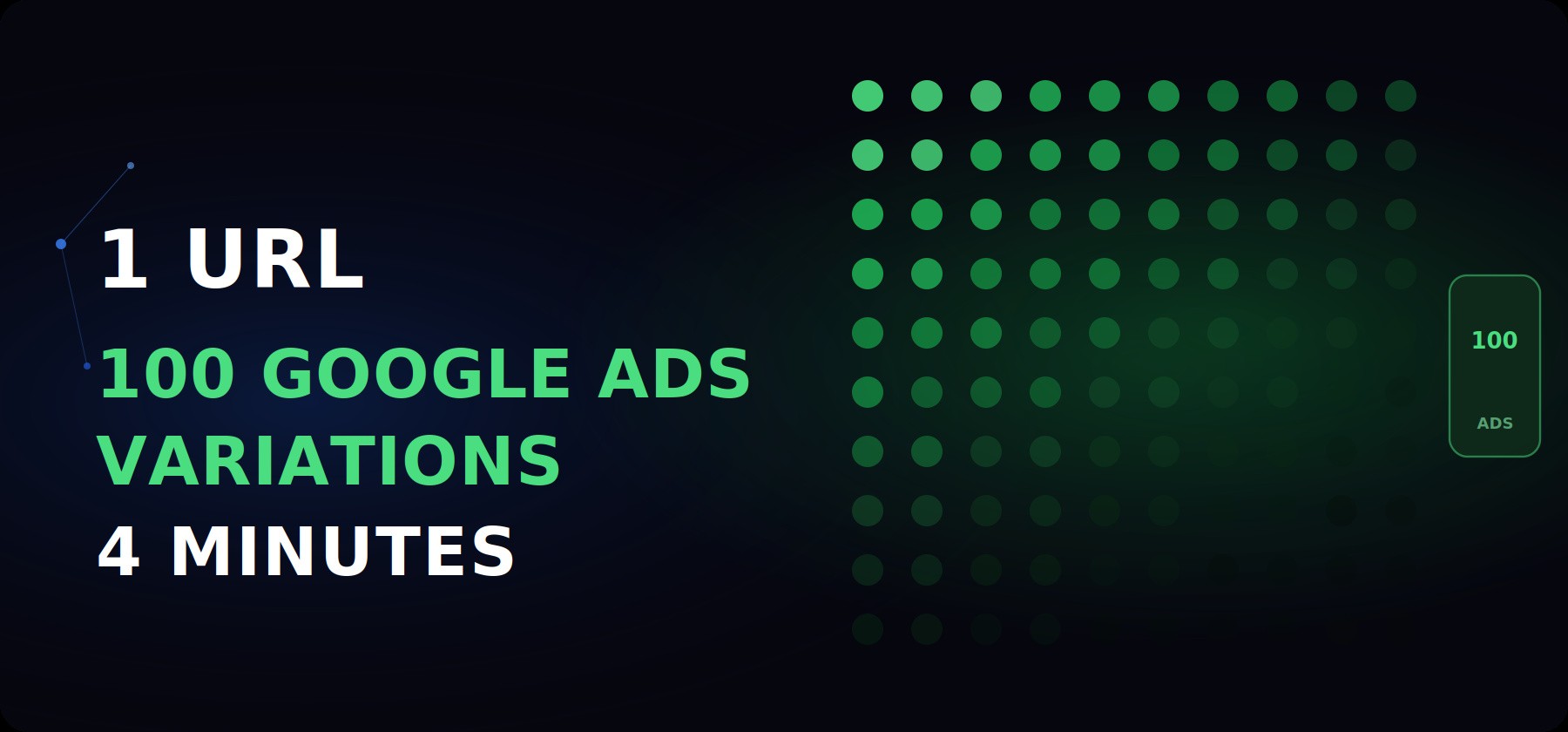
Most Google Ads accounts are running the same 3–5 RSA headlines they wrote
at launch. The angles haven't changed. The intents haven't been mapped. The
copy is doing the same job it was doing 6 months ago.
The problem isn't creativity. It's volume. Mapping intent to angle properly — for
every search type your page targets — takes hours to do manually.
One Claude prompt changes the maths entirely.
WHAT THIS PROMPT DOES
→ Reads your landing page URL and extracts 8 core search intents
→ For each intent, writes 5 RSA headlines across distinct angles
→ Output: 40 structured, launch-ready headlines from one URL
→ Add one line: get 40 matching descriptions — 80 assets total
WHAT THIS PROMPT DOES
→ Reads your landing page URL and extracts 8 core search intents
→ For each intent, writes 5 RSA headlines across distinct angles
→ Output: 40 structured, launch-ready headlines from one URL
→ Add one line: get 40 matching descriptions — 80 assets total
WHAT THIS PROMPT DOES
→ Reads your landing page URL and extracts 8 core search intents
→ For each intent, writes 5 RSA headlines across distinct angles
→ Output: 40 structured, launch-ready headlines from one URL
→ Add one line: get 40 matching descriptions — 80 assets total
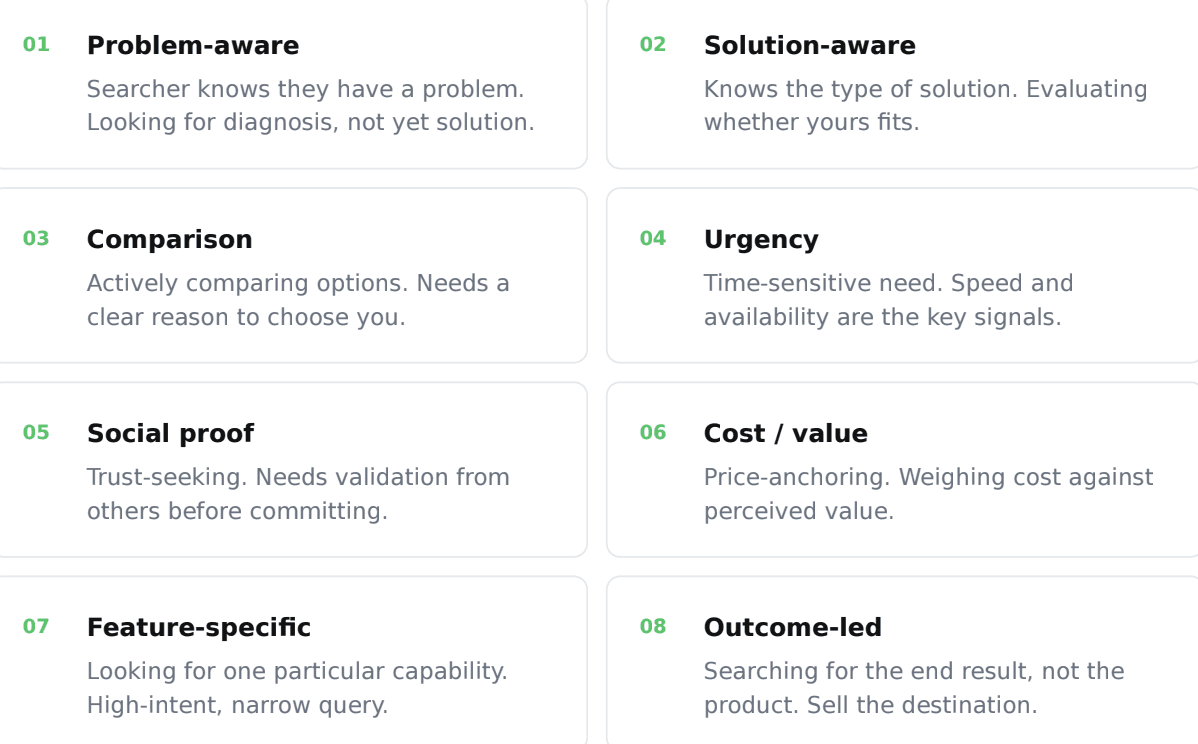
The 8 search intents every landing page targets
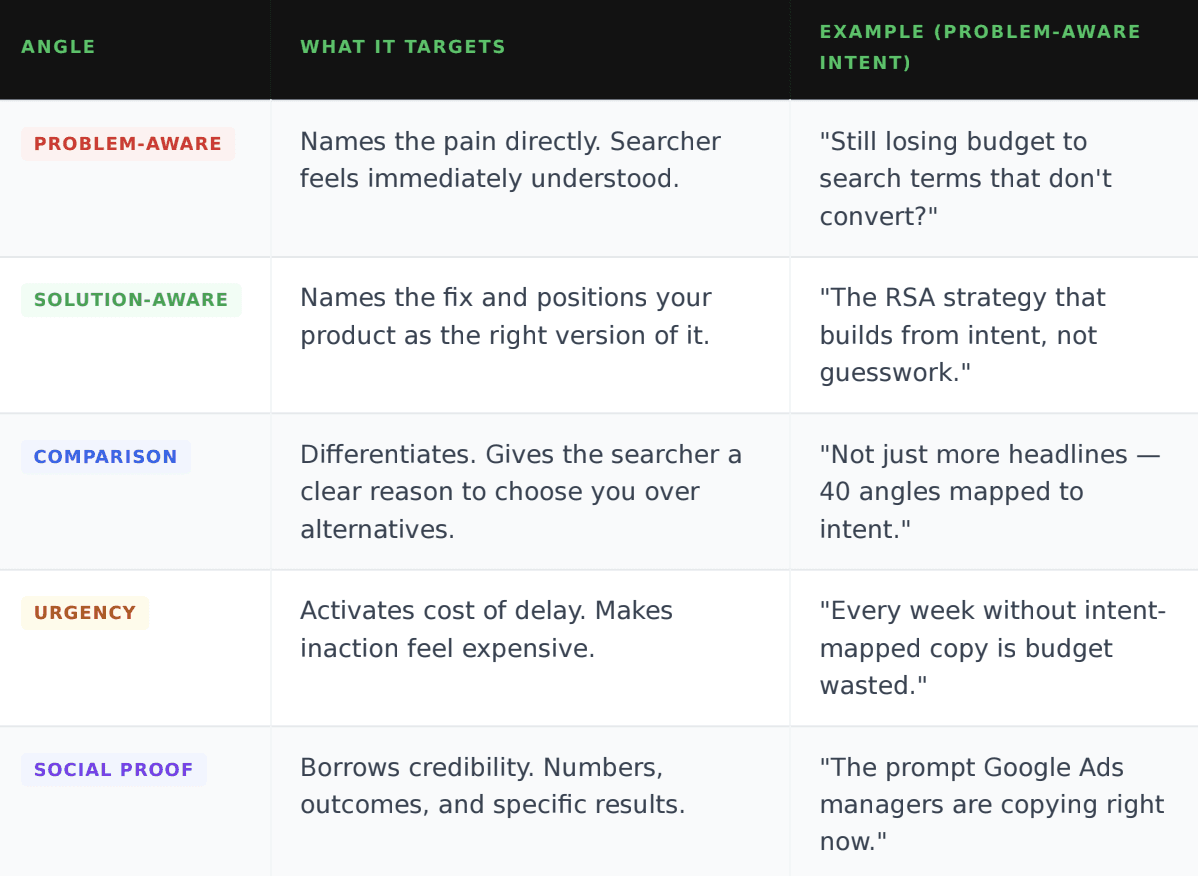
The 5 headline angles Claude writes for each intent
For each of the 8 intents, Claude writes one headline per angle. That's how you
get to 40. Every headline is structured around the emotional and rational logic
of that specific angle — not a generic variation of the same line.
8 intents x 5 angles = 40 RSA headlines +
40 descriptions = 80 assets
8 intents x 5 angles = 40 RSA headlines +
40 descriptions = 80 assets
8 intents x 5 angles = 40 RSA headlines +
40 descriptions = 80 assets
What the full output looks like
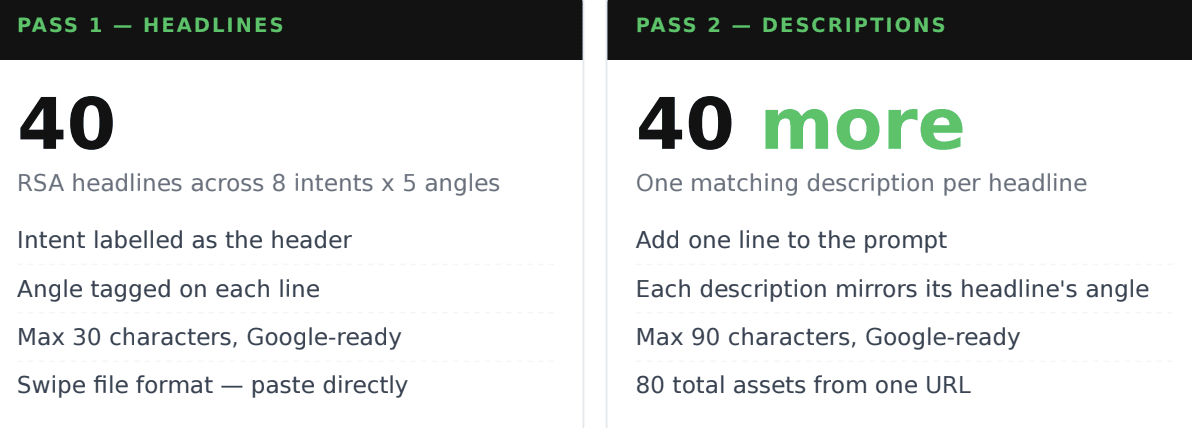
The prompt produces two passes. The first gives you 40 headlines. One extra
line doubles it to 80 total assets — headlines and matching descriptions — from
a single prompt run.
What Claude actually does with the URL
Here's the exact sequence. One prompt, one paste, structured swipe file output
— labelled by intent, formatted for immediate use.
1.Reads and analyses the landing page
Claude fetches the URL and reads every claim, benefit, and feature on the page
— the same way a senior strategist would, but looking specifically for the intent
signals embedded in the copy.
2.Identifies the 8 core search intents the page targets
From the page copy, Claude maps which of the 8 intent categories this product
addresses — and what a searcher with each intent is actually looking for when
they land here.
3.Writes 5 headlines per intent across distinct angles
For each intent, Claude writes one headline per angle — problem-aware, solution-
aware, comparison, urgency, and social proof. Each one is a complete, standalone
RSA headline within character limits.
4.Formats everything as a ready-to-use swipe file
Output arrives with intent as the section header and angle tagged on each line.
Clean enough to paste directly into Google Ads or hand to a media buyer without
any reformatting.
The prompt (copy this exactly)
Paste this into Claude with your landing page URL. Replace only the words in
brackets — everything else is intentional.
# Google Ads RSA Headline Generator
You are a senior Google Ads strategist.
Your task: Analyse this landing page and generate 40
structured RSA headlines I can use immediately.
Landing page URL: [PASTE YOUR URL HERE]
Step 1 — Identify 8 core search intents
Read the landing page and identify the 8 search intents
this page targets. Write each as a one-line description
of what a searcher with that intent is looking for.
Step 2 — Write 5 headlines per intent
For each of the 8 intents, write 5 RSA headlines —
one for each of these angles:
- Problem-aware: name the pain directly
- Solution-aware: position your product as the fix
- Comparison: give a clear reason to choose you
- Urgency: activate the cost of delay
- Social proof: borrow credibility with specifics
Each headline = max 30 characters. No punctuation at
the end. Immediately usable in Google Ads.
Step 3 — Format as a swipe file
INTENT [number]: [one-line description]
- [Angle] | [Headline copy]
- [Angle] | [Headline copy]
(repeat for all 5 angles)
# Rules:
# - Hard 30-character limit per headline
# - No generic phrases (best, top, leading)
# - Each headline works as a standalone asset
# - Vary sentence structure across the 40
# - No em dashes
Want 80 assets? Add this line after Step 3:
"Now write a matching description line for each
headline. Max 90 characters. Same angle, deeper
detail. Format: same intent/angle label, description
on the next line
# Google Ads RSA Headline Generator
You are a senior Google Ads strategist.
Your task: Analyse this landing page and generate 40
structured RSA headlines I can use immediately.
Landing page URL: [PASTE YOUR URL HERE]
Step 1 — Identify 8 core search intents
Read the landing page and identify the 8 search intents
this page targets. Write each as a one-line description
of what a searcher with that intent is looking for.
Step 2 — Write 5 headlines per intent
For each of the 8 intents, write 5 RSA headlines —
one for each of these angles:
- Problem-aware: name the pain directly
- Solution-aware: position your product as the fix
- Comparison: give a clear reason to choose you
- Urgency: activate the cost of delay
- Social proof: borrow credibility with specifics
Each headline = max 30 characters. No punctuation at
the end. Immediately usable in Google Ads.
Step 3 — Format as a swipe file
INTENT [number]: [one-line description]
- [Angle] | [Headline copy]
- [Angle] | [Headline copy]
(repeat for all 5 angles)
# Rules:
# - Hard 30-character limit per headline
# - No generic phrases (best, top, leading)
# - Each headline works as a standalone asset
# - Vary sentence structure across the 40
# - No em dashes
Want 80 assets? Add this line after Step 3:
"Now write a matching description line for each
headline. Max 90 characters. Same angle, deeper
detail. Format: same intent/angle label, description
on the next line
# Google Ads RSA Headline Generator
You are a senior Google Ads strategist.
Your task: Analyse this landing page and generate 40
structured RSA headlines I can use immediately.
Landing page URL: [PASTE YOUR URL HERE]
Step 1 — Identify 8 core search intents
Read the landing page and identify the 8 search intents
this page targets. Write each as a one-line description
of what a searcher with that intent is looking for.
Step 2 — Write 5 headlines per intent
For each of the 8 intents, write 5 RSA headlines —
one for each of these angles:
- Problem-aware: name the pain directly
- Solution-aware: position your product as the fix
- Comparison: give a clear reason to choose you
- Urgency: activate the cost of delay
- Social proof: borrow credibility with specifics
Each headline = max 30 characters. No punctuation at
the end. Immediately usable in Google Ads.
Step 3 — Format as a swipe file
INTENT [number]: [one-line description]
- [Angle] | [Headline copy]
- [Angle] | [Headline copy]
(repeat for all 5 angles)
# Rules:
# - Hard 30-character limit per headline
# - No generic phrases (best, top, leading)
# - Each headline works as a standalone asset
# - Vary sentence structure across the 40
# - No em dashes
Want 80 assets? Add this line after Step 3:
"Now write a matching description line for each
headline. Max 90 characters. Same angle, deeper
detail. Format: same intent/angle label, description
on the next line
How to use the output
Getting 40 headlines is step one. Here's how to turn them into actual performance data.
THE TEST ING FRAMEWORK
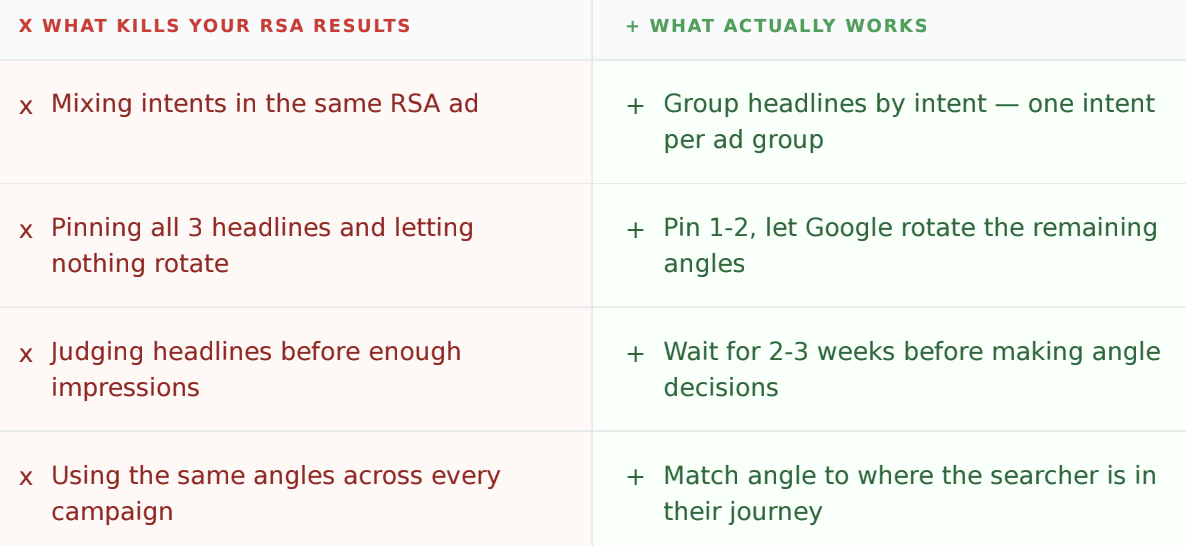
Pin 2–3 headlines per RSA from the same intent category and let Google rotate
the rest. After 2–3 weeks and enough impressions, check which angle is winning by
CTR. Then pin the top performer and replace the weakest with a new angle from the
same intent. Layer by layer until you have a clear winner per ad group
THE TEST ING FRAMEWORK
Pin 2–3 headlines per RSA from the same intent category and let Google rotate
the rest. After 2–3 weeks and enough impressions, check which angle is winning by
CTR. Then pin the top performer and replace the weakest with a new angle from the
same intent. Layer by layer until you have a clear winner per ad group
THE TEST ING FRAMEWORK
Pin 2–3 headlines per RSA from the same intent category and let Google rotate
the rest. After 2–3 weeks and enough impressions, check which angle is winning by
CTR. Then pin the top performer and replace the weakest with a new angle from the
same intent. Layer by layer until you have a clear winner per ad group
What you're building is an intent-matched asset library. Each test tells you
not just which headline won — it tells you which angle resonates with each
search intent in your account. That signal applies across every campaign you run from here.
Avoid these mistakes
The real advantage
Google Ads managers using this aren't replacing their strategic judgment.
They're offloading the volume problem to Claude so their judgment has more
material to work with.
What used to take a full strategy session now takes 4 minutes. The asset library
you build is intent-mapped, angle-tested, and ready to compound across every
campaign you launch.
Imperfect and testable today beats perfect and ready next week. Every time.
1 URL = 8 intents x 5 angles = 80 assets = 4 minutes
1 URL = 8 intents x 5 angles = 80 assets = 4 minutes
1 URL = 8 intents x 5 angles = 80 assets = 4 minutes
More structured assets = cleaner signal = winning accounts faster.
That's the whole game.